word processor program wanted

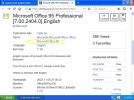
I don't recall which one I used, but I went to archive.org and searched for office 95 and picked whichever was highest downloaded, such as the following link to an english
please can you explain where you download it from that site?

And did you actully download it and getting it running?
 
I don't recall which one I used, but I went to archive.org and searched for office 95 and picked whichever was highest downloaded, such as the following link to an english
THANK YOU! I think I'll have an interesting Sunday testing it -- and I'm confident that I'll find quite a a number of missing annoyances with respect to its successor :D
 
please can you explain where you download it from that site?

And did you actully download it and getting it running?
1- position your mouse on the link to Office 95
2- click left on it - in a few seconds the download page should open
3- on the right side you'll see four rectangular frames: click left on the first line "(ISO IMAGE") of the frame titled "DOWNLOAD OPTIONS"
4- the frame should now read "OFF95BCD1 / OFF95BCD2 (on two consecutive lines) - left click on "OFF95BCD1"
5- a window should now open on your screen asking where you want to save the file - provide a folder where you can retrieve it later on, then click "Save"
6- now click left on "OFF95CD2", specify the same folder, then click "Save"
7- once both files are fully downloaded, call for help again if you don't know what to do with them
 
1- position your mouse on the link to Office 95
2- click left on it - in a few seconds the download page should open
3- on the right side you'll see four rectangular frames: click left on the first line "(ISO IMAGE") of the frame titled "DOWNLOAD OPTIONS"
4- the frame should now read "OFF95BCD1 / OFF95BCD2 (on two consecutive lines) - left click on "OFF95BCD1"
5- a window should now open on your screen asking where you want to save the file - provide a folder where you can retrieve it later on, then click "Save"
6- now click left on "OFF95CD2", specify the same folder, then click "Save"
7- once both files are fully downloaded, call for help again if you don't know what to do with them
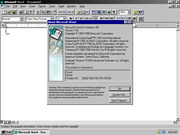
T think we are seeing two different screens hear
 

Attachments

  • screenshot for xp forum.JPG
    screenshot for xp forum.JPG
    71.5 KB · Views: 11
Just keep in mind that your Microsoft Works CD will save in a proprietary document format that cannot be used in Microsoft Office and other office suites.
You would need to first download and install the Microsoft Works Converter from Microsoft.com before sending your documents to other people, or opening them on other computers.
Hopefully Microsoft still offers the converter on their website, and hopefully you can find it!
(This is all done by design: Microsoft Works was often given away to broke school students to lock them into Microsoft productivity suites. Kind of like a free trial, you know?)
 
Just keep in mind that your Microsoft Works CD will save in a proprietary document format that cannot be used in Microsoft Office and other office suites.
You would need to first download and install the Microsoft Works Converter from Microsoft.com before sending your documents to other people, or opening them on other computers.
Hopefully Microsoft still offers the converter on their website, and hopefully you can find it!
(This is all done by design: Microsoft Works was often given away to broke school students to lock them into Microsoft productivity suites. Kind of like a free trial, you know?)
it finally turned up in the post
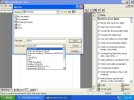
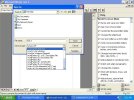
there seams to be quite a few formats to save to. please see the attachments
 

Attachments

  • screenshot for xp forum 1.JPG
    screenshot for xp forum 1.JPG
    112.2 KB · Views: 2
  • screenshot for xp forum 2.JPG
    screenshot for xp forum 2.JPG
    116.6 KB · Views: 2
Back
Top