What PC do you use for Windows XP?

That's a pretty good XP machine>>>

I have a bunch I use mostly a Dell e1705 with ATI Graphics 2 GB RAM XP SP3 Corporate & a Dell D820 nVidia Graphics 4 GB RAM XP SP3 Corporate But also a Lenovo ThinkPad X200 Intel Graphics 4 GB RAM XP SP3 Corporate, Lenovo ThinkPad R500 Intel Graphics 4 GB RAM XP SP3 Corporate, Acer Aspire One D250 Netbook Intel Graphics 2 GB RAM Dual Atom, A nice near mint Toshiba Satellite P-25 Single Core 2.85 GHZ 2 GB RAM nVidia Graphics Patched to XP SP3 from SP1, A Compaq Presario C600 Single Core 2 GB RAM XP SP3 Corporate, A Single Core HP Zv5000 with 1.25 GB RAM XP Pro, A mint Toshiba Satellite U400 4 GB RAM Intel Graphics XP SP3 Corporate, A Dell D400 with 1 GB RAM & XP SP3 & my shop Laptop which is a HP Pavilion Dv4000 with 1.5 GB RAM XP SP3....

Then I got a Dell D830 I have to change the screen on & two others that have windows 10 on...
 
Good machine... I got a D400 & a D820 & D830 as well as a e1705 which is my most used current... No ten dollar deals on them but I did get the D400 for 20 bucks back in 2013....

My ten-dollar toshiba u400 with win10 had backlight go out which was internet machine but I got a MINT u400 I just switched out HDDs takes 5 minutes...

I ain't hooking up any of my prime customized XPs online anymore... Only time they have a problem is with one's hooked to the net... I notice that win10 64bit uploads-downloads worlds faster, plus there are a few sites that require super-updated browsers to work no longer a do-able thing with XP...
 
Nice D400! It looks a lot like the D600. Also I have XP SP1 on the D600, Home Edition because I have an official Dell Disc from before.
 
I'm on two Frankenstein-like desktops pieced together from freshly purchased motherboards, DRAMs, graphic cards and CPUs, and the rest looted from my well fed electronic junkyard.
In a nutshell:
MB: ASROCK Z77 - ASROCK Z68
CPU: Intel Core i5 3470 3.2GHz quad core - Intel Core i5 2500K 3.3GHz quad core
DRAM: 4GB DDR3 dual channel 666 MHz - 16GB DDR3 dual channel 665 MHz
GRAPH: 1023MB NVIDIA GeForce GTX 560 Ti - 1023MB NVIDIA GeForce GTX 560 (point of view)
DISPLAY: 2 x SAMSUNG 1920x1200 pixel, 1 shared
HDD: 1x500GB mounted, 2x1TB external - 1x500GB mounted, 6x1TB external
KVM switch to share keyboard, mouse and one monitor between the systems.

Had to ask speccy, for in the other room the old girl has a similar (but not identical) arrangement and thus I tend to forget what is where and which is which... :rolleyes:
 
Last edited:
I'm on two Frankenstein-like desktops pieced together from freshly purchased motherboards, DRAMs, graphic cards and CPUs, and the rest looted from my well fed electronic junkyard.
In a nutshell:
MB: ASROCK Z77 - ASROCK Z68
CPU: Intel Core i5 3470 3.2GHz quad core - Intel Core i5 2500K 3.3GHz quad core
DRAM: 4GB DDR3 dual channel 666 MHz - 16GB DDR3 dual channel 665 MHz
GRAPH: 1023MB NVIDIA GeForce GTX 560 Ti - 1023MB NVIDIA GeForce GTX 560 (point of view)
DISPLAY: 2 x SAMSUNG 1920x1200 pixel, 1 shared
HDD: 1x500GB mounted, 2x1TB external - 1x500GB mounted, 6x1TB external
KVM switch to share keyboard, mouse and one monitor between the systems.

Had to ask speccy, for in the other room the old girl has a similar (but not identical) arrangement and thus I tend to forget what is where and which is which... :rolleyes:

You don't have an XP rig?
 
DELL D600 UPDATE:
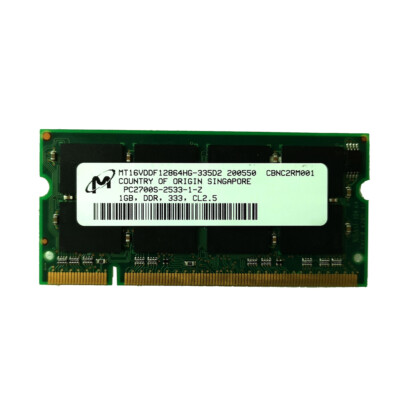
A couple weeks ago I purchased new RAM for my Latitude D600.

The RAM I bought:

Now research of the RAM says it is 2.5V, the Latitude D600 manual says it uses 3.3V RAM, and google AI says 2.5V, so I opened the RAM door on the bottom of the laptop and it says 2.5V on the RAM slot. Is Dell's Manual or the RAM Slot correct. I am scared that I will get the RAM and it will fry my Dell Laptop. Just tell me if the Manual or RAM slot is correct, and if that RAM I bought is compatible with the D600.

EDIT: I just checked the RAM in my Dell, searched up the RAM Model and found out it is 2.5V, so If the RAM in the Dell that is working is 2.5V, does that mean that the Dell uses 2.5V RAM?
 
Last edited:
All memory, including your DDR, have different keys and notches cut into different spots on the bottom of the memory modules. These notches make it physically impossible to install incompatible memory into a motherboard, so no you won't fry your computer :)

(Keeping this in mind, if you can't get it in, rotate it 180 degrees and try again.)
 
All memory, including your DDR, have different keys and notches cut into different spots on the bottom of the memory modules. These notches make it physically impossible to install incompatible memory into a motherboard, so no you won't fry your computer :)

(Keeping this in mind, if you can't get it in, rotate it 180 degrees and try again.)
Thanks dude, you always help me with my laptop problems, so the 3.3v and 2.5v are different notches? also is the manual or the RAM/Mobo correct?
 
Thanks dude, you always help me with my laptop problems, so the 3.3v and 2.5v are different notches? also is the manual or the RAM/Mobo correct?
Witch each ram specification they move the notch. That way incorrect ram doesn't fit. The manual if you have it, it should tell you which ram to get. Or you can always look at the sticker the ram has. But the manual will tell you how much Ram the motherboard supports in MB or GB.
 
Witch each ram specification they move the notch. That way incorrect ram doesn't fit. The manual if you have it, it should tell you which ram to get. Or you can always look at the sticker the ram has. But the manual will tell you how much Ram the motherboard supports in MB or GB.
Manual says 3.3v, but the RAM slot on the computer says 2.5v and the ram model hat came in that dell after research is 2.5v
 
I have an HP Compaq DC7700 Convertible Minitower (2007)
Specs:
CPU: Intel Core 2 Duo E6400
GPU: Nvidia Geforce GT 610
RAM: 2GB Quad-Channel DDR2
HDD: Western Digital Caviar Blue 320GB (7200RPM)
OS: Windows XP Home Edition SP3
I use a Samsung R510 laptop;
Specs:
CPU: Intel Core 2 Duo 2000 MHz T7350
RAM: 2GB misc DDR3
GPU: (built-in) Intel GMA 4500MHD
HDD: 150GB Fujitsu 5000 RPM
OS: Windows XP SP5 (the modernized community version)
Speakers: Intel High Definition Audio
 
My Dell Latitude D600 Specs:
CPU: Intel Pentium M 1.4 GHz
RAM: 2GB DDR-333 (Used to be 256MB)
GPU: ATI Mobility Radeon 9000 (32MB)
HDD: 40GB Hitachi Travelstar 5400RPM (IDE)
OS: Windows XP Home Edition SP3 (Used to be SP1)
 
I know this is not a Windows XP PC, but XP is supported on it.
I am getting a Dell Latitude E6410
CPU: Intel Core i5-520M (2.4GHz)
RAM: 4GB DDR3
GPU: Intel graphics
HDD: 240GB HDD
OS: Windows 7 Home Premium SP1
 
Back
Top