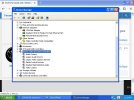
I do not know!What does Device Mgr. have listed under Sound, Video, Game Controllers" ?
(I would play with RealTek settings if installed)
But I have included a screen shot to show anyway

I do not know!What does Device Mgr. have listed under Sound, Video, Game Controllers" ?
(I would play with RealTek settings if installed)
It was from some link off of over clocks forum; where I am going in a moment LOL!Where did you find the drivers?
There is no audio in the tray, only internet, safety remove hardware and anti virusThe Realtek audio drivers come with many (CD) MB chipset drivers packages, and you shouldn't need any additional audio drivers. If you don't see any obvious damage on the MB (blown caps, etc), then sound problems are usually software related.
There should be a Realtek Audio Manager icon in the tray. Check out all the settings to make sure it's not something as simple as speaker output selection.
I went to the control pannelThe Realtek audio drivers come with many (CD) MB chipset drivers packages, and you shouldn't need any additional audio drivers. If you don't see any obvious damage on the MB (blown caps, etc), then sound problems are usually software related.
There should be a Realtek Audio Manager icon in the tray. Check out all the settings to make sure it's not something as simple as speaker output selection.
Under the Audio Tab, is RealTek set for both audio and midi playback?I went to the control pannel
Is this what you wanted to see
There is no realteck there! please see atachmentUnder the Audio Tab, is RealTek set for both audio and midi playback?
What kind of speakers, and how many, do you have hooked up to the machine?
We don't see an attachment.... and you are talking about hardware, not software settings.There is no realteck there! please see atachment
Sorry forgot to add it, hear it isWe don't see an attachment.... and you are talking about hardware, not software settings.
Go back to your own post #3, click on the link to the MB Manual, and it will tell you on page 11 what all the audio outputs are for.
We are trying to help you, but you're not helping us do that. Did you click on the Audio tab when you were in the Control Panel Windows "Sounds and Audio Device Properties" ? You should see Realtek listed as the default audio output.
You were asked what kind of speakers you have. Now you say you only have head phones?
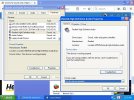
double click that yellow "audio device on high definition audio bus"Hi
Have an inbuilt sound card into the mother board, but Device Manager is showing question marks; please see the attachment. Just installed service pack 3 and no differance
Any help please?
Thanks
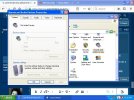
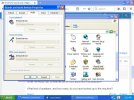
The first screenshot is actually more important, because it doesn't list any default output devices. In fact, they appear to be greyed out? Did you click on the down arrow to see if Windows lists any devices available? If there aren't any, then the Realtek audio is not properly installed.please see second screen shot
 theretroweb.com
???Did you click on the down arrow to see if Windows lists any devices available?
That is where I got the drivers from origonally!Another member has already posted this link. Have you been to this site (clicked on Drivers) and downloaded the Audio & Network drivers still available?
HP Goldfish3-GL8E
HP Goldfish3-GL8E is a motherboard based on the Intel 915GV (Grantsdale-GV) chipset. Get specs, BIOS, documentation and more!
I downloaded the first one and no good. please see first attachment. Then downloaded the second one and nothing! please see second attachmentdouble click that yellow "audio device on high definition audio bus"
click the Details tab
click Device Instance ID and change it to Hardware ID
starting with VEN, google that line, such as "VEN_1106&DEV_0397&SUBSYS_1043836C"
and enjoy your drivers, you'll find tons of results.
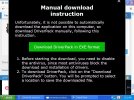
Alternatively, simply go to www.driverpack.io and let it do all the work for you. That's the one myself and others here use, so you know it's trustworthy.
Plug your headphones or speakers into the light green 3.5mm jack, that's the standard output one, and some sound cards want something plugged into that before they detect stuff.
I've never seen this situation with all greyed out devices, and wanted OP to confirm that they actually are greyed out. I've had MSI or Asus MB's in a few machines now, and I've never seen this "botched" Realtek install either. Device Mgr. says it's installed, but not available? In fact, since I've always used SoundBlaster audio, I tried to uninstall Realtek in the past.... couldn't be done! LOLImWolf, I have seen that before with Playback and Record greyed out and being unable to select the down arrow, and different drivers fixed it.
Those to are grey scale and do not work!
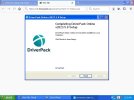
the program keeps crahing no good!So driverpack installed, great, now run the program, from the shortcut it made on the start menu.
ImWolf, I have seen that before with Playback and Record greyed out and being unable to select the down arrow, and different drivers fixed it.
I managed to open it up now and it says the following are availbie for instalation. no mention of any sound heardouble click that yellow "audio device on high definition audio bus"
click the Details tab
click Device Instance ID and change it to Hardware ID
starting with VEN, google that line, such as "VEN_1106&DEV_0397&SUBSYS_1043836C"
and enjoy your drivers, you'll find tons of results.
Alternatively, simply go to www.driverpack.io and let it do all the work for you. That's the one myself and others here use, so you know it's trustworthy.
Plug your headphones or speakers into the light green 3.5mm jack, that's the standard output one, and some sound cards want something plugged into that before they detect stuff.