
You are using an out of date browser. It may not display this or other websites correctly.
You should upgrade or use an alternative browser.
You should upgrade or use an alternative browser.
Drivers for sound card
- Thread starter old pc
- Start date


Most likely the driver you're looking for is (or was) on the DVD that came with the motherboard.
If that DVD got lost in the fogs of the past (as it normally happens), the driver is probably still available for download on the manufacturer's website (have ready the MB version/ID number/model/whatever).
If you don't find it there, then you'll better brace yourself for a damn long frustrating search on the Internet Archive - but if you're stubborn enough in the end you'll probably find it
If that DVD got lost in the fogs of the past (as it normally happens), the driver is probably still available for download on the manufacturer's website (have ready the MB version/ID number/model/whatever).
If you don't find it there, then you'll better brace yourself for a damn long frustrating search on the Internet Archive - but if you're stubborn enough in the end you'll probably find it
Yes the CD must of been with the original owner of the computer, and now lost at seaMost likely the driver you're looking for is (or was) on the DVD that came with the motherboard.
If that DVD got lost in the fogs of the past (as it normally happens), the driver is probably still available for download on the manufacturer's website (have ready the MB version/ID number/model/whatever).
If you don't find it there, then you'll better brace yourself for a damn long frustrating search on the Internet Archive - but if you're stubborn enough in the end you'll probably find it
But the good news is I know the motherboard is a ASUS PTGD1-LA(Puffer M-UL8E)
And the manual can be found hear https://theretroweb.com/motherboard...-mul8e-user-manual-6717d765bef20499832142.pdf
Just wonder where I would get the CD for it?
Then it's going to take some patience but there's still hope: for instance a 10-second search for "ASUS PTGD1-LA drivers" took me here. While I cannot guarantee that the link proffered there is really the one you're looking for, at least that's evidence that your driver still exists and someone else needs it too.Yes the CD must of been with the original owner of the computer, and now lost at sea
Unfortunately today I'm having a rather busy day, but I'm sure you can manage a thorough search by yourself. Just be careful: the internet is full of sharks and not all that glitters is gold (short for "run everything you download through a trusted AV before installing it").
Good luck!
I dont understand it! I mena i though you needed it on CD and you booted the CD from when you start the computer. I did however download the one in the link you supplied and installed it hear on win XP. and it found the missing programs but wants to charge £8.05 for it! So they must be a 3rd party, surly the manufatures would have it somewhere for free to download right?Then it's going to take some patience but there's still hope: for instance a 10-second search for "ASUS PTGD1-LA drivers" took me here. While I cannot guarantee that the link proffered there is really the one you're looking for, at least that's evidence that your driver still exists and someone else needs it too.
Unfortunately today I'm having a rather busy day, but I'm sure you can manage a thorough search by yourself. Just be careful: the internet is full of sharks and not all that glitters is gold (short for "run everything you download through a trusted AV before installing it").
Good luck!

When ever you need drivers, you always want to go to the manufacturers web site first. If for instance, it's a Dell computer, go to the Dell website. If however (might be your case?) it's a self built system, then go to the hardware website. Try your luck here:surly the manufatures would have it somewhere for free to download right?

You can try ASIO4ALL Last XP:
https://asio4all.org/about/download-asio4all/?query-0-page=8&cst
Just use the default settings.
https://asio4all.org/about/download-asio4all/?query-0-page=8&cst
Just use the default settings.
I dont know what the motherboard came out of. but I checked Asus's web site before and it was not listed! I dont understand itWhen ever you need drivers, you always want to go to the manufacturers web site first. If for instance, it's a Dell computer, go to the Dell website. If however (might be your case?) it's a self built system, then go to the hardware website. Try your luck here:
I dont see a search button on that siteYou can try ASIO4ALL Last XP:
https://asio4all.org/about/download-asio4all/?query-0-page=8&cst
Just use the default settings.
Let's start over.I dont understand it
What kind of computer do you have? Laptop/desktop/tower case? Name Brand?
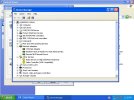
In Device Mgr., when you expand "Sound, Video, and Game Controllers", what is installed?
Have you tried removing the Unknown Devices with the question mark, and rebooting?
Since you say your MB has onboard audio, I'm assuming you have speakers hooked up to the outputs, and you're not muted or at low volume?
Its an old motherboard out of some PC, with sata IDE and RAM 1 and stuffLet's start over.
What kind of computer do you have? Laptop/desktop/tower case? Name Brand?
In Device Mgr., when you expand "Sound, Video, and Game Controllers", what is installed?
Have you tried removing the Unknown Devices with the question mark, and rebooting?
Since you say your MB has onboard audio, I'm assuming you have speakers hooked up to the outputs, and you're not muted or at low volume?
I uninstalled the question marks in device manages like you said and the error dissapeared! However I then rebooted, and they came back again
There are 2 sets soldered to the motherboard, one a 3.5mm set of colored out put jacks of plugs. and the other 2X phono jack out puts
Thanks
You don't need the physical CD/DVD: an ISO image of it (what you usually download) will do. And you don't need to boot from it: all you need is a small program (e.g. WinMountPortable) that "mounts" the ISO image - that is, that makes it visible to the system as if it were a real physical drive.I dont understand it! I mena i though you needed it on CD and you booted the CD from when you start the computer. I did however download the one in the link you supplied and installed it hear on win XP. and it found the missing programs but wants to charge £8.05 for it! So they must be a 3rd party, surly the manufatures would have it somewhere for free to download right?
At that point you just locate the autorun and run it.
that program wont download!You don't need the physical CD/DVD: an ISO image of it (what you usually download) will do. And you don't need to boot from it: all you need is a small program (e.g. WinMountPortable) that "mounts" the ISO image - that is, that makes it visible to the system as if it were a real physical drive.
At that point you just locate the autorun and run it.
though cnet went under years ago?
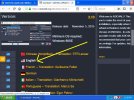
That's the driver. download and install. It is a universal driver. It might work. You probably won't need yje advanced settings unless you want to do fancy recording.I dont see a search button on that site
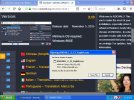
You mean the one in the image that I have attached?That's the driver. download and install. It is a universal driver. It might work. You probably won't need yje advanced settings unless you want to do fancy recording.
BTW it wont run!
Attachments
Just doing a quick search I found this.
https://theretroweb.com/motherboards/s/asus-ptgd1-la-oem-3
https://theretroweb.com/drivers/264
https://theretroweb.com/motherboards/s/asus-ptgd1-la-oem-3
https://theretroweb.com/drivers/264
I managed to find the drivers in the end thanks!Just doing a quick search I found this.
https://theretroweb.com/motherboards/s/asus-ptgd1-la-oem-3
https://theretroweb.com/drivers/264
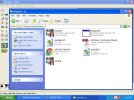
Downloaded installed them and rebooted machine, the yellow question mark has now gone in the control pannel, but sadly still no sound!
Where did you find the drivers?I managed to find the drivers in the end thanks!
Downloaded installed them and rebooted machine, the yellow question mark has now gone in the control pannel, but sadly still no sound!