
You are using an out of date browser. It may not display this or other websites correctly.
You should upgrade or use an alternative browser.
You should upgrade or use an alternative browser.
You tube downloader program wanted
- Thread starter old pc
- Start date


yt-dlp is great if you are willing to learn it. The program covers more than YouTube.
Searching ''Steam'' on their issues page:
https://github.com/yt-dlp/yt-dlp/issues?q=is:issue state:open Steam
Here's a reprint of my method:
So I'll usually preview the YT via Invidious frontend:
Select instance - Invidious
And If I need a copy of the vid, I use yt-dlp for XP!
https://github.com/nicolaasjan/yt-dlp/releases -> Show all assets, 1st time get the yt-dlp_x86_winXP.zip. Then you can update by just swapping out new yt-dlp_x86_winXP.exe with old yt-dlp.exe (I like to rename the exe)
(DO Not update via command line -U for XP version!) yt-dlp updates ~2x Month or more.
FWIW, my commands:
1) yt-dlp.exe --list-formats https://www.youtube(DOT)com/etc.
2) After getting formats (I usually stick with 480p or 360p but they're all there) I'll command line e.g.:
yt-dlp.exe --continue --format 18+139 https://www.youtube(DOTcom/etc
Definitions:
--continue (if you lose connection just paste the command back in and it picks up where it left off.
--format (after looking at available formats, you can mix and match. I recommend putting the vid format number before the audio format number) 18 (360p .mp4)+139 (129kbps .m4a)
other commands:
yt-dlp.exe --continue --write-auto-subs --convert-subs srt --format xxx+xxx https://www(DOT)youtube.com/etc
I like to choose the .webm formats if available (Higher quality IMHO same size) but some times only the audio is available, or I want an .mp4 container for the .webm version for some reason:
--remux-video mp4
E.g
yt-dlp.exe --continue --write-auto-subs --convert-subs srt --format xxx+xxx --remux-video mp4 https://www.youtube(DOT)com/etc
Oh yea on last IMPORTANT! thing. Put ffmpeg.exe & ffprobe.exe in the yt-dlp directory.
XP get here:
Download FFMPEG 7.1 For XP (XP Mod, otherwise use the current ffmpeg & libfdk-aac builds)
https://rwijnsma.home.xs4all.nl/files/ffmpeg/ffmpeg-7.1-2362-6aafe61-win32-static-xpmod-sse.7z
(Note: The developer has stopped updating ffmpeg for XP)
Searching ''Steam'' on their issues page:
https://github.com/yt-dlp/yt-dlp/issues?q=is:issue state:open Steam
Here's a reprint of my method:
So I'll usually preview the YT via Invidious frontend:
Select instance - Invidious
And If I need a copy of the vid, I use yt-dlp for XP!
https://github.com/nicolaasjan/yt-dlp/releases -> Show all assets, 1st time get the yt-dlp_x86_winXP.zip. Then you can update by just swapping out new yt-dlp_x86_winXP.exe with old yt-dlp.exe (I like to rename the exe)
(DO Not update via command line -U for XP version!) yt-dlp updates ~2x Month or more.
FWIW, my commands:
1) yt-dlp.exe --list-formats https://www.youtube(DOT)com/etc.
2) After getting formats (I usually stick with 480p or 360p but they're all there) I'll command line e.g.:
yt-dlp.exe --continue --format 18+139 https://www.youtube(DOTcom/etc
Definitions:
--continue (if you lose connection just paste the command back in and it picks up where it left off.
--format (after looking at available formats, you can mix and match. I recommend putting the vid format number before the audio format number) 18 (360p .mp4)+139 (129kbps .m4a)
other commands:
yt-dlp.exe --continue --write-auto-subs --convert-subs srt --format xxx+xxx https://www(DOT)youtube.com/etc
I like to choose the .webm formats if available (Higher quality IMHO same size) but some times only the audio is available, or I want an .mp4 container for the .webm version for some reason:
--remux-video mp4
E.g
yt-dlp.exe --continue --write-auto-subs --convert-subs srt --format xxx+xxx --remux-video mp4 https://www.youtube(DOT)com/etc
Oh yea on last IMPORTANT! thing. Put ffmpeg.exe & ffprobe.exe in the yt-dlp directory.
XP get here:
Download FFMPEG 7.1 For XP (XP Mod, otherwise use the current ffmpeg & libfdk-aac builds)
https://rwijnsma.home.xs4all.nl/files/ffmpeg/ffmpeg-7.1-2362-6aafe61-win32-static-xpmod-sse.7z
(Note: The developer has stopped updating ffmpeg for XP)
There is no "1st time get the yt-dlp_x86_winXP.zip" from that link!
And If I need a copy of the vid, I use yt-dlp for XP!
https://github.com/nicolaasjan/yt-dlp/releases -> Show all assets, 1st time get the yt-dlp_x86_winXP.zip. Then you can update by just swapping out new yt-dlp_x86_winXP.exe with old yt-dlp.exe
this makes no sence! there is no x86/winxp file to download. and since there are a dozen+ files from that option anyway, finding x86/winxp would be a needel in a hay stack!I meant the first time you download, get the file: yt-dlp_x86_winXP.zip.
Go to https://github.com/nicolaasjan/yt-dlp/releases
>2026.07.14.042219
>Assets
>Show all 29 Assets
>yt-dlp_x86_winXP.zip
>2026.07.14.042219
>Assets
>Show all 29 Assets
>yt-dlp_x86_winXP.zip
looks like it was hidden from the drop down menu. found it and installed it now thanks!Go to https://github.com/nicolaasjan/yt-dlp/releases
>2026.07.14.042219
>Assets
>Show all 29 Assets
>yt-dlp_x86_winXP.zip
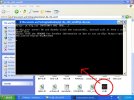
Next job is trying to work out how to open it as there is no read me file (please see screen shot)
Attachments
Found a great yt-dlp resource. A command line ''Cheat Sheet''
https://www.ditig.com/yt-dlp-cheat-sheet
You can save the page to view offline. I'm keeping a copy resident in my yt-dlp folder.
https://www.ditig.com/yt-dlp-cheat-sheet
You can save the page to view offline. I'm keeping a copy resident in my yt-dlp folder.

That's excellent info.yt-dlp is great if you are willing to learn it. The program covers more than YouTube.
Searching ''Steam'' on their issues page:
https://github.com/yt-dlp/yt-dlp/issues?q=is:issue state
Here's a reprint of my method:
So I'll usually preview the YT via Invidious frontend:
Select instance - Invidious
And If I need a copy of the vid, I use yt-dlp for XP!
https://github.com/nicolaasjan/yt-dlp/releases -> Show all assets, 1st time get the yt-dlp_x86_winXP.zip. Then you can update by just swapping out new yt-dlp_x86_winXP.exe with old yt-dlp.exe (I like to rename the exe)
(DO Not update via command line -U for XP version!) yt-dlp updates ~2x Month or more.
FWIW, my commands:
1) yt-dlp.exe --list-formats https://www.youtube(DOT)com/etc.
2) After getting formats (I usually stick with 480p or 360p but they're all there) I'll command line e.g.:
yt-dlp.exe --continue --format 18+139 https://www.youtube(DOTcom/etc
Definitions:
--continue (if you lose connection just paste the command back in and it picks up where it left off.
--format (after looking at available formats, you can mix and match. I recommend putting the vid format number before the audio format number) 18 (360p .mp4)+139 (129kbps .m4a)
other commands:
yt-dlp.exe --continue --write-auto-subs --convert-subs srt --format xxx+xxx https://www(DOT)youtube.com/etc
I like to choose the .webm formats if available (Higher quality IMHO same size) but some times only the audio is available, or I want an .mp4 container for the .webm version for some reason:
--remux-video mp4
E.g
yt-dlp.exe --continue --write-auto-subs --convert-subs srt --format xxx+xxx --remux-video mp4 https://www.youtube(DOT)com/etc
Oh yea on last IMPORTANT! thing. Put ffmpeg.exe & ffprobe.exe in the yt-dlp directory.
XP get here:
Download FFMPEG 7.1 For XP (XP Mod, otherwise use the current ffmpeg & libfdk-aac builds)
https://rwijnsma.home.xs4all.nl/files/ffmpeg/ffmpeg-7.1-2362-6aafe61-win32-static-xpmod-sse.7z
(Note: The developer has stopped updating ffmpeg for XP)
I've been using yt-dlp for a few years now and also still use youtube-dl.exe for BBC radio downloads.
I've often got 10 to 20 dos boxes simultaneously downloading from places like ok.ru in background on XP
for ffmepeg i've been using version 3.4.1 and have never found ffprobe.exe.
So I tried your link :-https://rwijnsma.home.xs4all.nl/files/ffmpeg/ffmpeg-7.1-2362-6aafe61-win32-static-xpmod-sse.7z
but got redirected, but when I searched for "ffmpeg-7.1-2362-6aafe61-win32-static-xpmod-sse.7z"
I came across this link:- https://reino.synology.me/ffmpeg/ffmpeg-7.1-2362-6aafe61-win32-static-xpmod-sse.7z
which did work. I haven't opened it yet, but wanted to thanks for the original info & link.
I also found 2 books going cheap on ebay a while back, although all info seems easily found online, but I like paper books, as they're easier tofall asleep with!
ISBN-10: 1479327832 ISBN-13: - 9781479327836 & ISBN-10: 0998453021 ISBN-13 - 978-0998453026
if you look at the screen shot the command line refers you to read the read me files at x address. But at x address there is no read me file at all! i dont know why they dont do what everyone ells dose and put the read me file in the download folder. but any way it dose not work so I will be deleting the file to save on disk spacelooks like it was hidden from the drop down menu. found it and installed it now thanks!
Next job is trying to work out how to open it as there is no read me file (please see screen shot)
EDIT**** Just opened the yt as seen in screen shot. typed a key and the program closes down. this program is currupt! now going to remove it
again another one that dose not workFound a great yt-dlp resource. A command line ''Cheat Sheet''
https://www.ditig.com/yt-dlp-cheat-sheet
You can save the page to view offline. I'm keeping a copy resident in my yt-dlp folder.
Attachments
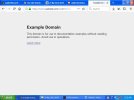
If you have not tried it yet then how do you know it works?I came across this link:- https://reino.synology.me/ffmpeg/ffmpeg-7.1-2362-6aafe61-win32-static-xpmod-sse.7z
which did work. I haven't opened it yet, but wanted to thanks for the original info & link.
I updated info regarding my experience with that version:That's excellent info.
I've been using yt-dlp for a few years now and also still use youtube-dl.exe for BBC radio downloads.
I've often got 10 to 20 dos boxes simultaneously downloading from places like ok.ru in background on XP
for ffmepeg i've been using version 3.4.1 and have never found ffprobe.exe.
So I tried your link :-https://rwijnsma.home.xs4all.nl/files/ffmpeg/ffmpeg-7.1-2362-6aafe61-win32-static-xpmod-sse.7z
but got redirected, but when I searched for "ffmpeg-7.1-2362-6aafe61-win32-static-xpmod-sse.7z"
I came across this link:- https://reino.synology.me/ffmpeg/ffmpeg-7.1-2362-6aafe61-win32-static-xpmod-sse.7z
which did work. I haven't opened it yet, but wanted to thanks for the original info & link.
I also found 2 books going cheap on ebay a while back, although all info seems easily found online, but I like paper books, as they're easier tofall asleep with!
ISBN-10: 1479327832 ISBN-13: - 9781479327836 & ISBN-10: 0998453021 ISBN-13 - 978-0998453026
https://www.xpforums.com/threads/adobe-audition-3-0-1.935642/post-3275857
Basically I rolled back to ffmpeg-6.2-609-238f9de-win32-static-xpmod-sse.7z
That's because v7 does not work with The Fraunhofer ibfdk-aac v 2.0.3 for me.
No it dosent!I came across this link:- https://reino.synology.me/ffmpeg/ffmpeg-7.1-2362-6aafe61-win32-static-xpmod-sse.7z
which did work.
Attachments
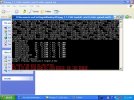
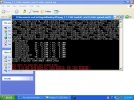
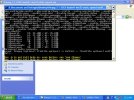

Yes it does..... and, "No security vendors flagged this file as malicious"No it dosent!
a picture says 1000 wordsYes it does..... and, "No security vendors flagged this file as malicious"
But I guess there are people in this world that will always believe that 2+2=5
Your pictures paint 1000 words of gibberish.... can't even see what you typed at the prompt. If you own a mouse, maybe you should try just clicking on the LINK?a picture says 1000 words
But I guess there are people in this world that will always believe that 2+2=5
The LINK works fine, and downloads the archive "ffmpeg-7.1-2362-6aafe61-win32-static-xpmod-sse.7z".
Kinda strange... you've ask for assistance with a few software issues on this forum, and have been given LINKS that work fine for everyone else, but in your case the LINKS never work.
Did not type anything at the prompt. I opened the ffmpeg, the ffplay and ffprobe by means of double clicking them. Presumably the command prompt would of more then likly of been "C:\documents and settings\a ratbag user\desktop\another pointless download folder\ffmpeg" est estcan't even see what you typed at the prompt.
And the results of the above are the screen shots I provided above that, that shows that the emperor is wearing nothing at all (covid-19 and emperor's new cloths!)
Last edited:
You can't just double click an executable if it's intended to be used at the DOS Prompt, without first studying the required syntax and what all the required input needs to be to perform whatever that specific program is designed to carry out. You might as well be going to the DOS prompt and just typing "copy" without anything else..... you will achieve nothing. You have used the CMD Prompt b4 right???Did not type anything at the prompt. I opened the ffmpeg, the ffplay and ffprobe by means of double clicking them.
Last edited: