Time for a new UserAgent string again.

Sadly, my credit card company has updated their security again, so I can no longer login to view account activity using either MyPal68 (13.7b) or 360Chrome browsers.

According to the site info which I can access via Linux, they require Windows 7, with either FF52 or Chrome 57, so I've been playing with various site specific UA strings spoofing Win7, but no joy thus far. (site tries to load, but then I get "error" at the end of the URL and am handed a blank page). The only partial success was with a Win10 UA, but the site didn't display in a usable manner.

Apparently, the newest version of FF still supported by Win7 is V.115 (and then 115 EOSR), so I've tried various strings including;

Mozilla/5.0 (Windows NT 6.1; WOW64; rv:115.0) Gecko/20100101 Firefox/115.0 Mypal/68.13.7

Mozilla/5.0 (Windows NT 6.1; rv:115.0) Gecko/20100101 Firefox/115.0 Mypal/68.13.7

Mozilla/5.0 (Windows NT 6.1; rv:115.0) Gecko/20100101 Firefox/115.0

Adding or removing the WOW64 or Mypal/68.13.7 elements from the string haven't helped so far.

I can of course access my account using Linux, but it's a PITA having to go back and forth across the room between two machines, so I'd much rather get all my information back on one screen if possible.

Got any ideas?
 
will be watching this question as I no longer can download my statements from my bank, but at least I can still view my account actions, :)
The site hosts just can't leave well enough alone! I've also noticed that Bitchute comments no longer load with the MyPal browser. (but they do load with 360Chrome).
 
Sorry if I'm beating a dead horse, but I've had luck forcing Discover into submission by using uMatrix to block the webpage's connection to a script from online-metrix.net Then I was able to use it normally.

Does your XP have enough resources to run a virtual machine? I keep MXLinux open in VMWare 10.0.7 on my XP64 with plenty of memory, it loads extra-picky sites like Hulu with DRM. That would save you from getting out of the chair! In that vein, there's always KVM switches haha or VNC connections!

Have you tried Chrome user agents? I've had luck with those, all though it feel like I need to shower afterwards... (I'm using MyPal's "User-Agent Switcher" with its built-in presets and per-website settings)

The Win10 UA you tried specified Chrome or Firefox? Mozilla/5.0 (Windows NT 10.0; Win64; x64; rv:138.0) Gecko/20100101 Firefox/138.0
Also try zooming in/out away from 100%, I've seen that fix the element placements (or blocking certain CSS's with uMatrix). And there's always View > Page Style > No Style!
 
Last edited:
Sorry if I'm beating a dead horse, but I've had luck forcing Discover into submission by using uMatrix to block the webpage's connection to a script from online-metrix.net Then I was able to use it normally.
uMatrix caused the site to crash much faster, so that's an improvement. :b
Does your XP have enough resources to run a virtual machine? I keep MXLinux open in VMWare 10.0.7 on my XP64 with plenty of memory, it loads extra-picky sites like Hulu with DRM. That would save you from getting out of the chair! In that vein, there's always KVM switches haha or VNC connections!
Even if I could, I don't want to setup a VM just to access one site.
Have you tried Chrome user agents? I've had luck with those, all though it feel like I need to shower afterwards... (I'm using MyPal's "User-Agent Switcher" with its built-in presets and per-website settings)
Yes, I've tried various UA with 360Chrome... no joy. Also with Firefox "switcher". I can't find a specific UA Switcher for MyPal.
The Win10 UA you tried specified Chrome or Firefox? Mozilla/5.0 (Windows NT 10.0; Win64; x64; rv:138.0) Gecko/20100101 Firefox/138.0
Also try zooming in/out away from 100%, I've seen that fix the element placements (or blocking certain CSS's with uMatrix). And there's always View > Page Style > No Style!
With all the UA variants I specified a version of FF. The login page loads fine, but after entering User/Pass the next page usually displays ghost images briefly and then just a blank page. The only exception thus far was with a Win10 UA which gave me some tiny menu items at the top of the page, but they weren't links.
 
Yeah like Elizabeth has pointed out, if any resources are behind a cloudfare-enabled 3rd-party site, seemingly they won't load no matter what we do. Cloudfare must have very accurate detection, perhaps proprietary. My attempts at bypassing cloudfare have resulted only in tab crashes.
 
will be watching this question as I no longer can download my statements from my bank, but at least I can still view my account actions, :)
Which browser / version are you using Elizabeth?

With all the browser spoofing I've tried via either add-on's or editing the config settings, I wonder if my banking website is detecting the actual Windows XP OS instead of which ever browser I'm telling them is running on that OS? If this is the case, how does one spoof an OS?
 
mypal 68.14.4
I had installed that version not long ago, and then down graded to 68.13.7b (14.4 had issues on my machine). I don't recall what the original UA was, but at the moment I'm using this "General" one which works fine 99%.

Mozilla/5.0 (Windows NT 5.1; rv:140.0) Gecko/20100101 Firefox/140.0 Mypal/68.13.7
 
SOLVED: (for the time being).

With some coaching from Cleverscreenname, I ended up D/L the Thorium browser. Don't really care for Chrome browsers too much, but it does get me access to that banking (credit card) site again. It also loads Bitchute comments like 360Chrome did, but MyPal68 did not.

The Thorium D/L options for XP are here, but you have to load the page with a Chrome based browser.

Direct link to Thorium for XP32 is here.

There's an option to run Thorium in Portable Mode so all settings and data remain in a single parent directory. Be sure to check the archived Readme File.
 
I had installed that version not long ago, and then down graded to 68.13.7b (14.4 had issues on my machine). I don't recall what the original UA was, but at the moment I'm using this "General" one which works fine 99%.

Mozilla/5.0 (Windows NT 5.1; rv:140.0) Gecko/20100101 Firefox/140.0 Mypal/68.13.7
Yeah I have no intention to update ever past 68.14.7b ... I won't even touch version 71.

I've been having pretty good luck with:

Mozilla/5.0 (Windows NT 10.0; Win64; x64; rv:141.0) Gecko/20100101 Firefox/141.0

user_pref("general.buildID.override", "20100101");
user_pref("general.config.sandbox_enabled", false);
user_pref("general.oscpu.override", "Windows NT 10.0");
user_pref("general.useragent.override", "Mozilla/5.0 (Windows NT 10.0; Win64; x64; rv:141.0) Gecko/20100101 Firefox/141.0");

Good to know you found a browser that is working for you; though.
 
Last edited:
Yeah I have no intention to update ever past 68.14.7b ... I won't even touch version 71.

Good to know you found a browser that is working for you; though.
I have not looked at the various products in a while, but I'm going to test drive 68.14.7b next. I downloaded the "win32-sse" version which should work with my AMD Athlon 64 2x.

What would be the best method to upgrade from my current 68.13.7b and keep all the current settings? Is there something I should backup first in case I don't like the newer version?

I didn't look too hard for the description page, but I thought that the "68" series were intended for XP, and higher numbers were intended for Win7 or above?
 
Really, what I would do is put 7b in a totally different directory and launch it and it will created a new separate profile ... so this way you can test it to see if you like it and install your extensions. Of course you can just paste the new files in your currently directory but you'd be taking a chance if you don' like it; but it would then, of course, pick up your current profile and everything should work right, but I'm not saying to blindly trust me on this. That being said .... you will like 7b and I use it all the time will no issues and I run it hard. I would zip your copy of 68.13.7b and keep it for safe keeping; though.

Please let us know how you make out with the new version and good luck :)
 
Yeah I have no intention to update ever past 68.14.7b ... I won't even touch version 71.

I've been having pretty good luck with:

Mozilla/5.0 (Windows NT 10.0; Win64; x64; rv:141.0) Gecko/20100101 Firefox/141.0

user_pref("general.buildID.override", "20100101");
user_pref("general.config.sandbox_enabled", false);
user_pref("general.oscpu.override", "Windows NT 10.0");
user_pref("general.useragent.override", "Mozilla/5.0 (Windows NT 10.0; Win64; x64; rv:141.0) Gecko/20100101 Firefox/141.0");

Good to know you found a browser that is working for you; though.
I'm going to do some playing around with both of the Win32 versions, along with your settings in there. Can you refresh our memories of your system spec's? Are you running XP32 or 64?

Thanks,
Wolf
 
Sure thing!

Basically by running 68.14.7b you are staying with XUL - 8b was when he broke away from that and his browser is now in the infantry stage still; but I know he'll get it right one day because feodor is very smart.

I'm running XP32 (86) SP3

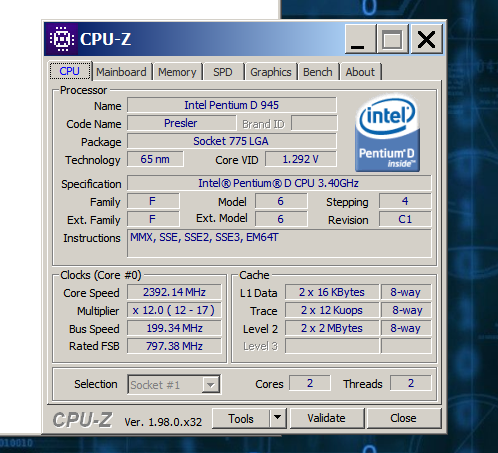
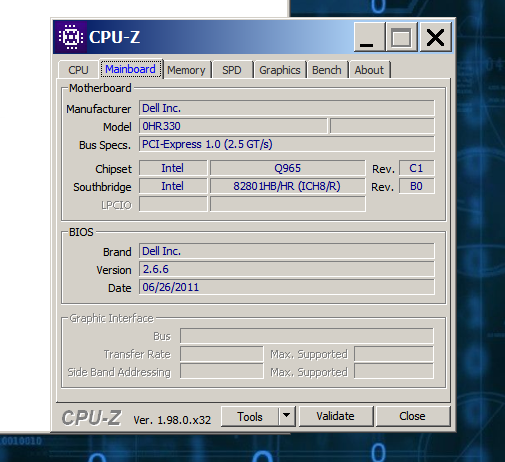
Here are my device specs.
untitled1-png.1619

untitled3-png.1620

untitled2-png.1621

untitled.png

untitled2.png


Good luck and enjoy and let us know how everything turns out.

Sal :)
 
Last edited:
Good luck and enjoy and let us know how everything turns out.

Sal :)
So I did some testing with both of the 32bit versions of Mypal68.14.7b (Win32 & Win32-SSE). In the various configurations I didn't notice any difference between them so far as speed, ability to load various web pages correctly, or CPU usage.

The SSE version is supposed to be more efficient with capable CPU's, so for now I'm sticking with that version.

Since I first used Mypal, there have always been 2 directories of files on the system which are inter-dependent;
C:\Program Files\MyPal68
C:\Documents and Settings\"User"\Application Data\Mypal68

I first zipped up both of these directories (of the current 68.13.7b browser).

After this however, I found it more convenient to just rename directories while testing different scenarios. So I renamed the Program Files directory to 13.7b, created a new Mypal68, and extracted mypal-68.14.7.en-US.win32-sse.zip into that directory. I have a hot key that will run the "Mypal.exe" in that directory, so saves a bit of time.

The updated browser loaded with all previous settings and add-ons, with 2 minor exceptions. It nagged me about closing multiple tabs, and the icon for "User-Agent Switcher" wasn't visible. I had to hover the mouse over that area of the task bar to confirm it was still installed. I ended up removing, and re-installing it, and then there was just a white box where the original icon had been in the past.

This is when I noticed that unlike V.13.7b, V14.7b doesn't have the search feature for add-ons. You have to use a search engine instead.

Running with the previous version settings was kinda slow, and the same problem web pages weren't improved. So then I changed and/or added to the "about:config" file per xperceniol's above recommendations;
user_pref("general.buildID.override", "20100101")
user_pref("general.config.sandbox_enabled", false)
user_pref("general.oscpu.override", "Windows NT 10.0")
user_pref("general.useragent.override", "Mozilla/5.0 (Windows NT 10.0; Win64; x64; rv:141.0) Gecko/20100101 Firefox/141.0")

This made a drastic difference. Web sites were loading fast and correctly displayed. On video sites, 3.5 hour videos loaded in about 5 seconds (bitchute) with the comments and all other features available. One healthcare related site I could only load b4 by booting into Linux ran fine. And all of my financial sites also ran without any issues. I did further testing after this, but this is eventually the configuration I kept.

Cloudflare (bleepingcomputer.com) is still not cooperating, and I wasted some time on that.... but that's not something I even visit regularly.

One small disappointment is that ChatGPT.com no longer loads... goes to white screen after initial attempt to load. I played with that for a little bit too even trying site specific UA's which I thought had worked in the recent past. I like playing around with that bot every so often, so I'll have to spend some more time figuring it out.

So thank you Sal.... this update was well worth the time.
Wolf
 
Back
Top