The 'Official' Nichimen Mirai Thread (Nendo Too)>>>

I have Mirai working on many XP machines... I am actually the one who figured out how to get it to work back in 2018... So this thread will be about obtaining it & getting it to run right everytime & fixing common problems AKA 'flushing the toilet' & other maintenance...

Why do it? Well Mirai is STILL one of the best modelers around yes, 26 years later still... Wings3D is Mirai-like in operation but FAR from the same... Mirai is coded in CommonLISP & Wings3D is coded in that obscure ERLANG which is it's downfall as ERLANG is very viewport 'chuggy'... Mirai can go way higher polys in the viewport, Nendo too... Both Mirai & Nendo have 3D paint so you can finish up your model 'inhouse'... Mirai one can also do 2D paint as well... Here a user did a portrait of his parents in Mirai 2D paint-
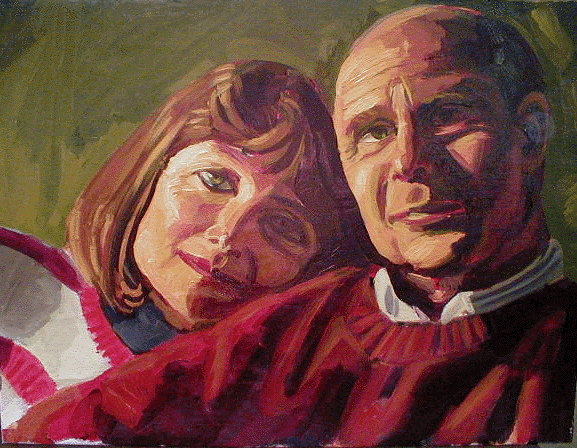
mom-n-pop.gif


Not long after Mirai was gone most other packages matched or exceeded most Mirai features within a few years except for modeling & even at that the last version of Mirai that was released which was 1.1a SP2 even the pro users had not figured out the new features with some being discovered by 'happy accident' as the manuals were never updated as Mirai had a very poor online help system... Can't imagine that was a wise decision but this connection was also used as a conduit to check out license validity...

But Izware, who had Mirai for years & never sold it to anyone has been gone since 2019... Can't believe they lasted that long...

3KGdnVH.gif


Now Mirai, Like Nendo & also Wings3D is a VOLUME modeler... Which means you must always be modeling on a volume, no poly-by-poly... There are ways to obtain similar in situations that need it like with the 'Chip Off Region' command that's in both Mirai & Nendo...

Mirai has some intense fame for it's short life... Bay Raitt was a pro user as well as Martin Krol... For Lord Of The Rings Bay Raitt made over 600 head morphs for Golum which were exported out to native systems... I heard that the first Poser figures were done in Mirai but not confirmed...

teJGqbn.gif


John Feather was also very good & his was mind-blowing for the time... Grunty Faces-

grunty01.jpg


hands.jpg

hands_subdivided.jpg


Mirai has very powerful translations that can be based off just about any aspect of your scene or objects & these are augmented by whether you are using the LMB, RMB or MMB when invoking the command as well as various modifier keys being pressed... it gets deeper than that even...

Well, we are 'fading in' on this subject & there will be much more before getting to the 'MEAT' of it... I have not used Mirai for a couple years so have to get some 'chops' back...

As far as machines any XP SP3 with a OpenGL of 1.x will work best When first getting working I had a Toshiba Satellite A85-S107 with a Radeon 9000... Not a very good machine as far as performance but ran Mirai just great... here is GUIs from it-

These were my custom colors-

Kf2Vyb5.jpg

QBqE7ID.jpg


Anyway, gotta go... There will be much more...
 
Last edited:
Looks like the spam is crossing the line. If it hits my thread I'm gone. I'll move to a new host/site.
Will you consider contacting the administrators on this one?
 
I don't think the spammer is trying to sell his little daughters or sisters, he just aims to closing down this forum.
Now guess who might be disturbed by the survival of good old XP despite all their efforts to ditch it (to prevent it from competing with their new bloatware-loaded monstrosities).
By leaving XPforums you'd be playing right into their hand.

And no, unfortunately there are no admins left who could take care of this obnoxious rat, we're on our own :(
 
Looks like the spam is crossing the line. If it hits my thread I'm gone. I'll move to a new host/site.
Will you consider contacting the administrators on this one?
Yeah, I reported this yesterday but none of that garbage seems to be taken down no matter where it appears on here... The pollution has become more personal now>>>
 
Anyways, Continuing on>>>

Here's the famous timelapse done by Bay Raitt in 1999-


Wish I was that fluent...

Martin Krol had several covering making a War Beast...

Amazing Box Modeling... I made screensavers out of these...


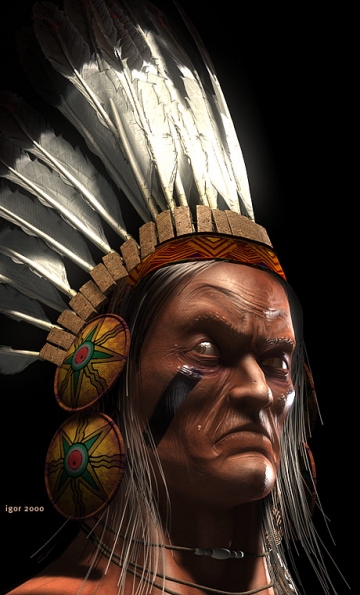
Indian by Igor Posavec... Modeled in Mirai & finished in 3ds Max 3.1-

indian.jpg


Ear GIF by Bay Raitt-

VTQCtxC.gif


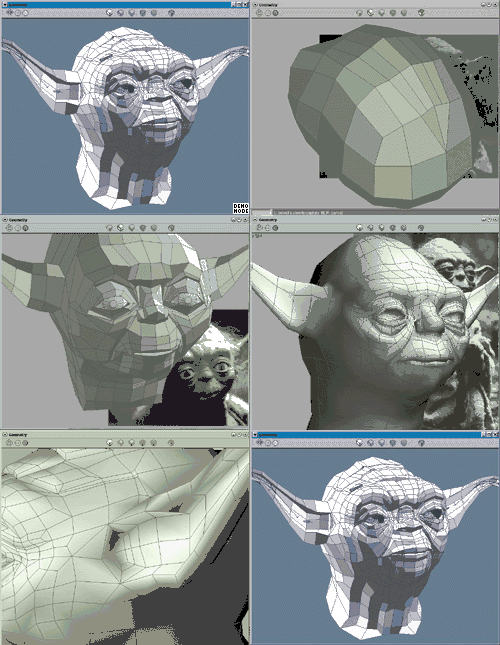
Yoda in Mirai by Ken Brilliant-

lkJ81de.jpg


Cx-Rz-V8-L.gif


The infamous Red Planet Mirai GIF-

Mirai-Planet.gif
 
Last edited:
OK, Perhaps ready to get it running?... Not every graphics card is gonna work, some may work but render might not work... On this case modeling, UVing & 2D-3D painting is all you can do then export out as OBJ... This often happens when trying Mirai on OpenGL 2.x cards... The real indicator is the selections of components like polygons, or edges, points... If Mirai don't like your card the selections will be difficult to obtain & may 'flash' on-off depending on angle or disappear altogether... OpenGL 1.x cards are the best bet but there are a few that don't work either like I have a toshiba P25 with one of those old nVidia GForce GO 5200 cards... Mirai won't even run on that machine...

Mirai has run fine on a toshiba satellite A85-s107 with a ATI Mobility Radeon 9000 series (Laptop been dead years now)... I presently have same card in an HP Pavilion zv5000 that I got off ebay just 3 years ago... I have a acer aspire ONE D250 netbook with a GM card & runs great & since Mirai is very respectful of screen space the 1000x600 screen is no problem... 8 years ago I bought a Compaq Presario C500 just because it had OpenGL 1.x... Works fine on that too... However it also won't run on an old HP dv4000 or my old Dell D400...

So it can be a crapshoot... But it does not need install but CrackLock DOES & KillPro is optional...

First thing... Even though classified as PORTABLE it is NOT!!... If you attempt to download & just double-click 'Start-Mirai.exe' it won't work & you will just write bad license file to disk so even if you get the process done after that it won't work, but it's fixable...

Both KillPro & CrackLock are included in the documents folder... You see, this guy got the archive from me then uploaded to archive.org, I remember him, a bit of an asshole so get it here-

https://archive.org/details/nichimen-mirai-1.1a-portable


Do NOT try to run it!!... Install CrackLock with all options including full system path then figure out where you are gonna put Mirai on your main HDD I usually always put in C/Program Files or D/Program Files...

Now open up CrackLock, which is just an advanced datefaker, & choose new then browse to 'Start-Mirai.exe' & choose that now enter any day of JUNE, 2002, Freeze time-date & system-wide option & for type choose 'injection' mode & then choose 'Start-Mirai.exe' then confirm... The EXE then will be injected so anytime you start Mirai the date will be in June of 2002, When Mirai is shut down the date will return to normal...

There will be a 'CLB' file created there in same directory as 'Start-Mirai.exe' if you did it right...

Note that I am not looking at anything right now just recalling so something might be labeled a bit different... This is all assuming an XP install & NOT an XP VM... Make sure your DX is up to date (9.04c)...

Now KillPro can be installed... It's a task manager but has ability to make a 'favorites' list of processes that can be ended with a single command... If you have something else that will do that then use it... There's a list of processes that Mirai invokes that need to be added... You see that sometimes or all the time depending on machine there will be processes that keep running after Mirai is shut down & when you restart you will have multiple instances running which will cause problems...

After doing all this you can engage 'Start-Mirai.exe'... One thing that will pop up on your firewall is that 'LMGRD.exe' wants to connect to the internet... Quickly allow this... It does not matter if you are offline or online you must allow the connection or Mirai won't work...

If you screw any of this up most likely a bad license file will be on your HDD so go to root drive C-D-E or whatever... C/Docs & Settings/USERNAME/AppData & there will be a '.mirai-1' folder... just delete that whole folder it will again be created then go back to HDD root & there will be a 'FlexLM' folder & delete anything that pertains to 'nichimen' or 'LMGRD' but not anything else especially if you have Maya installed as it uses same folder...

Now Mirai is refreshed, no more bad license...

You see, all this BS is necessary because Mirai is NOT an application but actually it's own OS that's running over windows... the .mirai folder is also where preferences are stored, I copy color prefs to use on other machines...

That should get you going... It sounds like alot but it's not since I am practiced I can have mirai up-running in 8-10 minutes easy including installing CrackLock...

More later>>>
 
Some ask why did they make Mirai as an operating system?... Answer was to make it as multitasking as possible... In Mirai you can model, UV map, 2D & 3D paint all at the same time all with their own respective viewports open & all interactive to one another... What the hell else can you do that in?

There seems to be less info on the internet all the time... Here's the Wiki-

https://en.wikipedia.org/wiki/Mirai_(software)

Notice they identify the software version because apparently now there's a malware that's named Mirai-

https://en.wikipedia.org/wiki/Mirai_(malware)

Winged Edge tech-

https://en.wikipedia.org/wiki/Winged_edge

Here's the last snapshot of Izware, The most bizarre of ventures... Right before the cough-cough-

https://web.archive.org/web/20190917035724/http://www.izware.com/mirai/
 
Just uploaded my Mirai Brush Library...

It also contains textures, they are all in MIR Mirai format... There is a folder of previews so you can see what any MIR looks like before bringing it into a scene...

The MIR format is kinda like PNG & has an alpha but Mirai can't use PNGs so I converted a bunch using the old photoshop plugin which works in old versions of photoshop (I used 5.5 from 1999)...

The folder is named 'Temp' because until you setup directories Mirai will look by default in C/Temp, or D/Temp or whatever letter HDD you got so you just unRAR on the main HDD root & it's ready to go...

https://archive.org/details/temp_20260725


MiraiSR.jpg
 
Question:
Are the download plug-ins on
https://web.archive.org/web/20190915015050/http://izware.com/support/mirai-downloads.htm
'''Mirai: Downloads''
Included in your package? If not, will they work?
Thanks.
Yes, Everything that could be used on that page is in there... The patches are not needed... The plugins are in the plugins folder but they have to be turned on to use... The photoshop plug is in their somewhere & motion capture is in the documents folder>>>
 
BTW - Here's what Mirai GUI looks like out of the box with the depressing grey everywhere... The only thing I did at this point was 'invert' the menu colors so it is then black menu with white letters which I like better...

MiraionZv5000.jpg
 
Have never used the 2D Paint in Mirai... So figured I'd try it as anything learned will translate right over to the 3D Paint... It's alot like Nendo's Paint Engine but far deeper plus not like photoshop but does have some cool features & filters... It'll take a bit of 'lernin'...

My Bamboo Tablet works fine in Mirai but Mirai is setup that pen pressure only affects opacity, not line width which is what I would expect as Mirai is not Adobe Illustrator & vice-versa... The 2D aspect can be used as a painter but is designed to assist 3D painting so you can 3D paint on the model but also apply more global FX in the 2D window that cannot be done in the 3D view...

BTW... Changing colors on the various swatches can be confusing... You FIRST go down to the lower right in the color editor & change the color to what is desired, then go back to any applicable swatch bands & MIDDLE click on them, they will then change to that color...

Mirai2Da.jpg


Mirai2Db.jpg


Now after shutting down Mirai & running Red700 to clear all Mirai processes I look at C/FLEXLM & delete files that will pile up overtime... This is the 'toilet flushing' I was talking about earlier>>>

MiraiFLEXLM.jpg
 
One thing I forgot to mention are domains... You use OpenGL for Modeling & Animation Preview & Mirai Domain for everything else...

OpenGL default is the pleasant green color... Toggle with 'D' key or use menu>>>

MiraiOpenGL-Strategic.jpg


Then render using Mirai Domain... I smoothed a few times for the creamy effect...

Mirai-Creamy.jpg


I changed the domain color so it is kinda similar...

Setting up Microsoft Strategic Commander for use as a shortcut utility for Mirai as I find keyboards to be an idiotic utility for shortcuts period... Anytime I hear someone say 'keyboard shortcut' I wanna run them over with my truck... Keyboards are made for TYPING!... And they are not well setup for that either...

Strategic Commanders were out when Mirai was alive... I am shocked nobody took advantage...

I have the first 2 levels mapped out, am gonna wait to see what is used for the 3rd level... I have this cutout that I open with ImageEye & it hides the frame so I just see the PNG & I can move it outta the way if need be... All that till I get used to the device & shortcuts it provides...

MIRAIshow.gif
 
Still more Still images (and a GIF)>>>

Bay Raitt's emaciated Fairy... "Someone give that Fairy a SANDWICH!!"...

fairy-1.jpg


Bay's Geisha-

bay_geisha_wire.jpg


Nice IMP someone did, I don't remember the name-

imp_r2.jpg


If you ever wanted to construct a Ghoul>>>

Ghoul_contruct.gif


Very nicely done Denizen by Martin Krol in 2003-

beorn-test-render.jpg


Bay's Fish-

fish-1.jpg


When I see this I always think 'MeatHead' once again by Bay-

bay_free.jpg


bay_free_wire.jpg
 
Back
Top