
You are using an out of date browser. It may not display this or other websites correctly.
You should upgrade or use an alternative browser.
You should upgrade or use an alternative browser.
Squeaky Mouse Time Error
- Thread starter Martingonn
- Start date

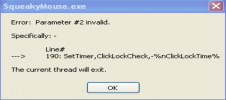
Yes, I know exactly what it is. It is a syntax error on line 190 of the code. I suggest trawling through the code and see where the error is. That is of course, if it is open source not machine code. Find out what procedure the line is refering to and correct for your system specifically.I hear the "right" sound, yet get this error. Any ideas on how to fix?
Last edited:
Just the thought of a squeaking noise being made every time I click the mouse irritates me. But then some people like to dress up in rubber dog costumes. I shouldn’t judge them.I hear the "right" sound, yet get this error. Any ideas on how to fix?
I can’t be bothered to extract the programming code from the machine code of this idiotic program. But, I suggest the generalised method.
Negative delay with variable (-%nClickLockTime%)
The - before %nClickLockTime% is correct (it makes the timer run once after the delay).
But if nClickLockTime is not defined or is non-numeric, this could cause an error.
Missing comma or incorrect variable syntax
If nClickLockTime is a variable, ensure it is properly defined earlier in the script.
Example of correct usage:
nClickLockTime := 1000 ; Define the variable first
SetTimer, ClickLockCheck, -%nClickLockTime%
How to Fix:
If this is a label + command, split it into two lines:
190:
SetTimer, ClickLockCheck, -%nClickLockTime%
If nClickLockTime is missing, define it before using it.
Ensure there are no extra spaces or typos in the command.
So, in layman’s language, has the programmer defined it.
I'll check if it is open source, probably not. The program is called Squeaky Mouse, but you can change the sound (which I did).Just the thought of a squeaking noise being made every time I click the mouse irritates me. But then some people like to dress up in rubber dog costumes. I shouldn’t judge them.
I can’t be bothered to extract the programming code from the machine code of this idiotic program. But, I suggest the generalised method.
Negative delay with variable (-%nClickLockTime%)
The - before %nClickLockTime% is correct (it makes the timer run once after the delay).
But if nClickLockTime is not defined or is non-numeric, this could cause an error.
Missing comma or incorrect variable syntax
If nClickLockTime is a variable, ensure it is properly defined earlier in the script.
Example of correct usage:
nClickLockTime := 1000 ; Define the variable first
SetTimer, ClickLockCheck, -%nClickLockTime%
How to Fix:
If this is a label + command, split it into two lines:
190:
SetTimer, ClickLockCheck, -%nClickLockTime%
If nClickLockTime is missing, define it before using it.
Ensure there are no extra spaces or typos in the command.
So, in layman’s language, has the programmer defined it.
It is not open-source, coded such an addition myself. Coming to Github tomorrow.Just the thought of a squeaking noise being made every time I click the mouse irritates me. But then some people like to dress up in rubber dog costumes. I shouldn’t judge them.
I can’t be bothered to extract the programming code from the machine code of this idiotic program. But, I suggest the generalised method.
Negative delay with variable (-%nClickLockTime%)
The - before %nClickLockTime% is correct (it makes the timer run once after the delay).
But if nClickLockTime is not defined or is non-numeric, this could cause an error.
Missing comma or incorrect variable syntax
If nClickLockTime is a variable, ensure it is properly defined earlier in the script.
Example of correct usage:
nClickLockTime := 1000 ; Define the variable first
SetTimer, ClickLockCheck, -%nClickLockTime%
How to Fix:
If this is a label + command, split it into two lines:
190:
SetTimer, ClickLockCheck, -%nClickLockTime%
If nClickLockTime is missing, define it before using it.
Ensure there are no extra spaces or typos in the command.
So, in layman’s language, has the programmer defined it.
Last edited: