
You are using an out of date browser. It may not display this or other websites correctly.
You should upgrade or use an alternative browser.
You should upgrade or use an alternative browser.
Recommendations for YTube video/audio downloader for XP ?
- Thread starter boss1968
- Start date


jDownloader on XP has been amazing for me over the years, and works on hundreds of websites not just youtube (and I download things from YouTube everyday. I've never even watched an ad LOL). It's 4,381 program files is annoying, but hey that's Java for you, and I just run it from a ramdrive so there's no performance hit.
I had heard that you can't install the current version on XP, though. You would need an earlier version to do this. Is that correct ? Thanks !jDownloader on XP has been amazing for me over the years, and works on hundreds of websites not just youtube (and I download things from YouTube everyday. I've never even watched an ad LOL). It's 4,381 program files is annoying, but hey that's Java for you, and I just run it from a ramdrive so there's no performance hit.
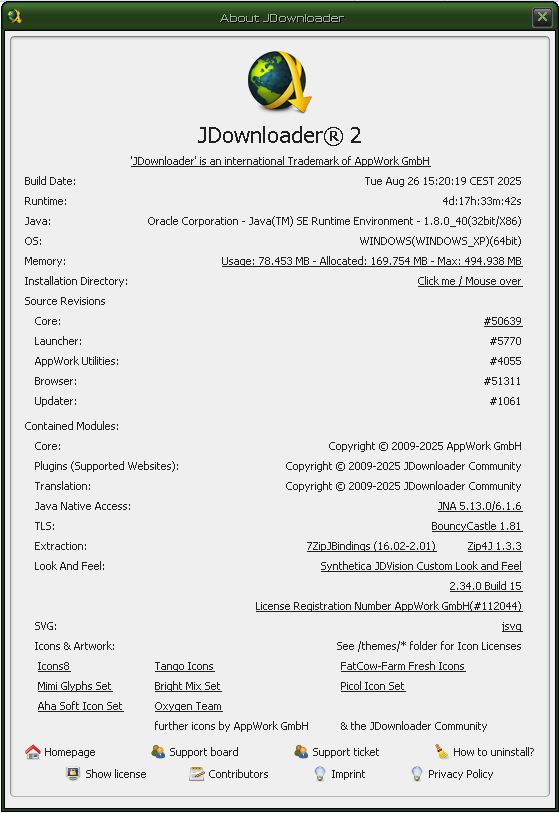
well this is what mine says, looks like last update was aug 26 2025. the homepage is jdownloader.org
Thanks ! I just e-mailed them to find out if their downloader will install and run on a Windows XP 32 bit computer. Fingers crossed, it does !
well this is what mine says, looks like last update was aug 26 2025. the homepage is jdownloader.org
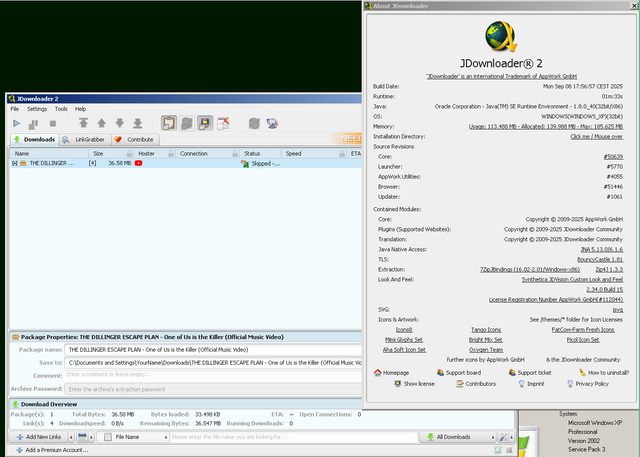
I couldn't get any download links from jdownloader.org to work on XP 32-bit, but the following download did work successfully:
JDownloader 2 Setup x64 & x86 : Free Download, Borrow, and Streaming : Internet Archive
Installation files for JDownloader2X64 & x86 versions15-2-2016
archive.org
(If you use a different folder, you'll have to compensate for that during the remaining instructions below.)
Note: I had already manually installed Java from http://www.oldversion.com/windows/java-platform-1-6-0-15 but that might not be a required step.
Some people say you need .NET installed, but my screenshot running on XP doesn't have .NET installed (.NET is quite bloated and slows your system down, so I try to avoid programs that require .NET)
Now, jDownloader and Youtube need FFmpeg manually installed, perhaps the license prohibits distribution inside JD? So get it from https://archive.org/download/ffmpeg-win-2.2.2_202107/ffmpeg-win-2.2.2.exe Run it and change it's installation folder to C:\Program Files\JDownloader2\Tools\Windows\FFMPEG
Open the jDownloader2 program, click the Settings tab, click Advanced Settings near the bottom, click OK to the warning, and inside the box Filter Settings type ffmpeg
at the bottom of Keys is FFmpegSetup: Binary Path
that line, all the way to the right (the Values column), you'll click NULL and change it to C:\Program Files\JDownloader2\Tools\Windows\ffmpeg\ffmpeg.exe
All done! Happy Youtube downloading!
Note: if you want to save hard drive space or download time, you can set Youtube (or other sites) to only download specific quality files, such as only 480p or only 1080p. That would be under Settings > Plugins > Please choose a plugin Youtube.com
When a video is in Linkgrabber, you can check just Audio for music links, or just Video for regular links. I quickly and easily download a lot of new music, legally, from Youtube.
Last edited:
Thanks !This is what JDownloader wrote back to me. Does this jive with your suggestions ?
I couldn't get any download links from jdownloader.org to work on XP 32-bit, but the following download did work successfully:
I recommend changing the installation folder to C:\Program Files\JDownloader2
JDownloader 2 Setup x64 & x86 : Free Download, Borrow, and Streaming : Internet Archive
Installation files for JDownloader2X64 & x86 versions15-2-2016archive.org
(If you use a different folder, you'll have to compensate for that during the remaining instructions below.)
Note: I had already manually installed Java from http://www.oldversion.com/windows/java-platform-1-6-0-15 but that might not be a required step.
Some people say you need .NET installed, but my screenshot running on XP doesn't have .NET installed (.NET is quite bloated and slows your system down, so I try to avoid programs that require .NET)
Now, jDownloader and Youtube need FFmpeg manually installed, perhaps the license prohibits distribution inside JD? So get it from https://archive.org/download/ffmpeg-win-2.2.2_202107/ffmpeg-win-2.2.2.exe Run it and change it's installation folder to C:\Program Files\JDownloader2\Tools\Windows\FFMPEG
Open the jDownloader2 program, click the Settings tab, click Advanced Settings near the bottom, click OK to the warning, and inside the box Filter Settings type ffmpeg
at the bottom of Keys is FFmpegSetup: Binary Path
that line, all the way to the right (the Values column), you'll click NULL and change it to C:\Program Files\JDownloader2\Tools\Windows\ffmpeg\ffmpeg.exe
All done! Happy Youtube downloading!
Note: if you want to save hard drive space or download time, you can set Youtube (or other sites) to only download specific quality files, such as only 480p or only 1080p. That would be under Settings > Plugins > Please choose a plugin Youtube.com
When a video is in Linkgrabber, you can check just Audio for music links, or just Video for regular links. I quickly and easily download a lot of new music, legally, from Youtube.
| jiaz Staff - 08/09/2025 11:39 AM You can run it with this method, see Installation and troubleshooting on NAS and embedded devices Basically you just download the JDownloader.jar file, place it into a folder and need a working Java 1.8 for Windows XP. You should be able to find one via search engine of your choice. Once you have found one, JDownloader itself will run but any download that do require ffmpeg (eg youtube) will not work until you find a working ffmpeg for that old OS It's not recommended to use XP and you can run an up2date linux distro on that machine and use latest versions of browser and ffmpeg instead |

I have used it myself with the older ffmpg. It's a one time thing and it works. fine. The best thing about Jdownloader is that you can download full playlists with it. The only thing you can't do with it is choose a language when the video has multiple. But I haven't seen any downloader able to do that either.
Well, the problem is, is that I am not tech savvy. I just can't start fooling around with changing code in my computer set up. I could screw everything up with one wrong letter. I need a downloader that is ready to install and work. I'm still in shock over the 3D downloader's quick end for XP usage. It was so useful. I've e-mailed the designer several times, but they never respond. I'm very grateful for all the help and info, but I need something ready to go. Thanks !
In my case I had Jdownloader installed in that computer since 2017 while it was still fully compatible. So I've been using it for years. I only had to use the FFMPEG replacement and didn't had any problems with it updating or anything as Jdownloader relies on Java more than the OS itself. But the thing is that they changed something to the installer and it doesn't work anymore on XP easily.Well, the problem is, is that I am not tech savvy. I just can't start fooling around with changing code in my computer set up. I could screw everything up with one wrong letter. I need a downloader that is ready to install and work. I'm still in shock over the 3D downloader's quick end for XP usage. It was so useful. I've e-mailed the designer several times, but they never respond. I'm very grateful for all the help and info, but I need something ready to go. Thanks !
As for alternatives. There's Xilisoft Youtube downloader. It installs fine. The problem with this one is that it breaks often. It needs to be updated more often and the developers are too slow. So anyways when in trouble just use a website to download. As long as you have a browser that works you can download videos.

Yes, as previously mentioned NET Frames slow down your machine... 1.1 or 2.0 with SP1-2 aren't bad but gets worse beyond 2.0... But I also don't like Java either with crappy backwards compatibility for many years... I have old Arturia Storm 2.0 & 3.0 that install old versions of Java... If installing much newer versions after that they refuse to work no matter what....
So for YT videos or Vimeo or Bitchute or Brighteon or whatever I simply use yandex.com (and nothing else) & search 'Youtube Download' & many pages will come up... With experience I know which ones not to use and often trying ones that worked in the past well they aren't updated that often so best to find new ones but usually in a few minutes i find one that works without hentai-gay-erotic game porn popping up...
Downloading is about the only way to go with so many ads all the time, I got rid of cable TV over 30 years ago for that shite... Of course NOW there's 'content creators' that are trying to sell stuff right in the middle of their casts with some 'leading their dialog' up into the whoring out... Many once trusted channels I cannot watch anymore...
So for YT videos or Vimeo or Bitchute or Brighteon or whatever I simply use yandex.com (and nothing else) & search 'Youtube Download' & many pages will come up... With experience I know which ones not to use and often trying ones that worked in the past well they aren't updated that often so best to find new ones but usually in a few minutes i find one that works without hentai-gay-erotic game porn popping up...
Downloading is about the only way to go with so many ads all the time, I got rid of cable TV over 30 years ago for that shite... Of course NOW there's 'content creators' that are trying to sell stuff right in the middle of their casts with some 'leading their dialog' up into the whoring out... Many once trusted channels I cannot watch anymore...
Yeah but if they do it with a sense of humor then it's worth watching, I've seen some VERY creative adverts that tie right into the host's video. Inserts during Rich Rebuilds videos are the most entertaining I've ever seen.

So I see many non forum people are checking this thread. Sorry to double post but it may help someone. yt-dlp has a working version for XP and is regularly updated. The command lines are really simple for the most basic usage. So here's the quick start outline again for anyone who is patient. You'll not need another downloader again!
To use yt-dlp for XP:
https://github.com/nicolaasjan/yt-dlp/releases -> For XP click "Show all 21 assets"
https://github.com/nicolaasjan/yt-dlp/releases/latest/download/yt-dlp_x86_Windows-XP.zip
Unzip to it's own directory e.g. D:\yt-dlp
Videos download to the native directory unless otherwise specified. I prefer to keep it off my C:\ drive which is busy enough.
To learn how to use it READ the README.md but to get you started here's some command lines using example URL (you'll have to replace (colon) with : ):
https(colon)//youtube.com/watch?v=-sB2bBd3GLs
Step 1: Find Available Formats:
yt-dlp.exe --no-cache-dir --list-formats https(Colen)//youtube.com/watch?v=-sB2bBd3GLs
Step 2: We'll keep it simple and stay in pure MP4.
On this Video we'll try 854 x 480 video and M4a audio (You would get better quality with webm even though the files are smaller in size... really)
We see the format code for mp4 854 x 480 video is 135
We see the format code for m4a 129k audio is 140
The command I would use would be:
yt-dlp.exe --no-cache-dir --console-title --continue --write-auto-subs --convert-subs srt --format 135+140 https(Colen)//youtube.com/watch?v=-sB2bBd3GLs
You now have the video.
If there are no subtitles, yt-dlp will ignore.
If you use .vtt subtitles do not include "--convert-subs srt"
If your Internet connection stops midway, do not delete partial file, just run the command again and it will pick up where it left off.
NOTE: for XP users DO NOT USE THE INTERNAL UPDATE COMMAND! (`-U`) YOU MUST UPDATE BY THE ABOVE DOWNLOAD METHOD.
yt-dlp Updates often.
If you want the most recent ffmpeg build for XP to place in the yt-dlp directory (Recommended):
Index of /files/ffmpeg
I use ffmpeg-6.2-609-238f9de-win32-static-xpmod-sse.7z (I have not tried the latest version 7.1; the developer has stopped updating this project).
Extract ffmpeg.exe and ffprobe.exe into same directory as yt-dlp.exe (You do not need the player exe)
If you get into more customization you'll need the ffmpeg files. I believe you need ffmpeg.exe to convert .vtt subtitles to .srt subtitles.
Sorry but I can give no further support. Becoming acquainted with basic command-line is a profitable venture IMHO. Read the README.md
P.S. yt-dlp downloads from many, many sites. Much more encompassing than that GUI 3D YouTube Downloader. Bitchute is a breeze for example.
To use yt-dlp for XP:
https://github.com/nicolaasjan/yt-dlp/releases -> For XP click "Show all 21 assets"
https://github.com/nicolaasjan/yt-dlp/releases/latest/download/yt-dlp_x86_Windows-XP.zip
Unzip to it's own directory e.g. D:\yt-dlp
Videos download to the native directory unless otherwise specified. I prefer to keep it off my C:\ drive which is busy enough.
To learn how to use it READ the README.md but to get you started here's some command lines using example URL (you'll have to replace (colon) with : ):
https(colon)//youtube.com/watch?v=-sB2bBd3GLs
Step 1: Find Available Formats:
yt-dlp.exe --no-cache-dir --list-formats https(Colen)//youtube.com/watch?v=-sB2bBd3GLs
Step 2: We'll keep it simple and stay in pure MP4.
On this Video we'll try 854 x 480 video and M4a audio (You would get better quality with webm even though the files are smaller in size... really)
We see the format code for mp4 854 x 480 video is 135
We see the format code for m4a 129k audio is 140
The command I would use would be:
yt-dlp.exe --no-cache-dir --console-title --continue --write-auto-subs --convert-subs srt --format 135+140 https(Colen)//youtube.com/watch?v=-sB2bBd3GLs
You now have the video.
If there are no subtitles, yt-dlp will ignore.
If you use .vtt subtitles do not include "--convert-subs srt"
If your Internet connection stops midway, do not delete partial file, just run the command again and it will pick up where it left off.
NOTE: for XP users DO NOT USE THE INTERNAL UPDATE COMMAND! (`-U`) YOU MUST UPDATE BY THE ABOVE DOWNLOAD METHOD.
yt-dlp Updates often.
If you want the most recent ffmpeg build for XP to place in the yt-dlp directory (Recommended):
Index of /files/ffmpeg
I use ffmpeg-6.2-609-238f9de-win32-static-xpmod-sse.7z (I have not tried the latest version 7.1; the developer has stopped updating this project).
Extract ffmpeg.exe and ffprobe.exe into same directory as yt-dlp.exe (You do not need the player exe)
If you get into more customization you'll need the ffmpeg files. I believe you need ffmpeg.exe to convert .vtt subtitles to .srt subtitles.
Sorry but I can give no further support. Becoming acquainted with basic command-line is a profitable venture IMHO. Read the README.md
P.S. yt-dlp downloads from many, many sites. Much more encompassing than that GUI 3D YouTube Downloader. Bitchute is a breeze for example.
Can you recommend a safe website to download YT videos in MP4 format on XP ? Thanks !In my case I had Jdownloader installed in that computer since 2017 while it was still fully compatible. So I've been using it for years. I only had to use the FFMPEG replacement and didn't had any problems with it updating or anything as Jdownloader relies on Java more than the OS itself. But the thing is that they changed something to the installer and it doesn't work anymore on XP easily.
As for alternatives. There's Xilisoft Youtube downloader. It installs fine. The problem with this one is that it breaks often. It needs to be updated more often and the developers are too slow. So anyways when in trouble just use a website to download. As long as you have a browser that works you can download videos.
Well, I could install it for you via the remote control software AnyDesk.com seeing as how it would only take me a few minutes. I understand that sounds scary though, so not everyone would jump at this option.Well, the problem is, is that I am not tech savvy. I just can't start fooling around with changing code in my computer set up. I could screw everything up with one wrong letter.
Anyways, I don't know of any website downloaders that still work.
Thanks for the offer. I'm using Turboscribe and it is perfect for YT downloading !Hi Boss1968 So I have a little time if you would like me to show you how to use YT-dlp as I think many would benefit from it.
 I highly recommend it.