
You are using an out of date browser. It may not display this or other websites correctly.
You should upgrade or use an alternative browser.
You should upgrade or use an alternative browser.
Microphone not working
- Thread starter old pc
- Start date

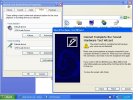
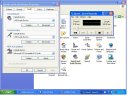

What is the 'USB Audio Device' you have everything hooked to? Have you opened the recording options panel? It's different from the volume panel... Have you tried muting the MS synth?
It is a sound port with a 3.5mm mike and a speaker jack on it plugged into the USB hubWhat is the 'USB Audio Device'
Im not sure what you mean? if you mean the Sound recording default device then you there is only that one option of the USB audio device showing. Please see photos aboveHave you opened the recording options panel? It's different from the volume panel...
???Have you tried muting the MS synth?
OK, I got one of those too probably very similar...
Mash the volume buttons for Playback & Sound Recording you should get a number of sliders which will also have a 'MUTE' tick... Check the 'OPTIONS' in the top menu bar to make sure everything is shown that can be shown...
Then eliminate something that's obviously malcontent as far as setting or if no clue play around one at a time & reset to way it was if no change...
In the volume panel it might be a good idea to MUTE the 'SW Synth' when not using as it may conflict with audio devices... That is the Microsoft MIDI Synth (unless you have other default)... I use the Yamaha one in XP, sounds very good>>>

Mash the volume buttons for Playback & Sound Recording you should get a number of sliders which will also have a 'MUTE' tick... Check the 'OPTIONS' in the top menu bar to make sure everything is shown that can be shown...
Then eliminate something that's obviously malcontent as far as setting or if no clue play around one at a time & reset to way it was if no change...
In the volume panel it might be a good idea to MUTE the 'SW Synth' when not using as it may conflict with audio devices... That is the Microsoft MIDI Synth (unless you have other default)... I use the Yamaha one in XP, sounds very good>>>
Last edited:
I tryed messing around with the speaker muteing. but made no effect!OK, I got one of those too probably very similar...
Mash the volume buttons for Playback & Sound Recording you should get a number of sliders which will also have a 'MUTE' tick... Check the 'OPTIONS' in the top menu bar to make sure everything is shown that can be shown...
Then eliminate something that's obviously malcontent as far as setting or if no clue play around one at a time & reset to way it was if no change...
In the volume panel it might be a good idea to MUTE the 'SW Synth' when not using as it may conflict with audio devices... That is the Microsoft MIDI Synth (unless you have other default)... I use the Yamaha one in XP, sounds very good>>>
View attachment 2291