You are using an out of date browser. It may not display this or other websites correctly.
You should upgrade or use an alternative browser.
You should upgrade or use an alternative browser.
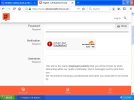
error with my pal browser
- Thread starter old pc
- Start date


You shouldn't put Windows XP online

It's CloudFlare that shouldn't be anywhere online!You shouldn't put Windows XP online

Ahh to have the World Wide Web be as it was. A planned fail IMO.
OldPC, This is my setup:
NM28XP for "everyday" browsing
https://rtfreesoft.blogspot.com/search/label/newmoon
I install AdBlock Latitude v5.0.9 (Free)
Supermium 126.0.6478.261 R7 for any cloudflare sites
https://github.com/win32ss/supermium/releases/tag/v126-r7
It's up to v144 but I don't upgrade unless I need and I have not had a problem getting anywhere yet.
I install AdBlock (Free) for chrome
https://adblockplus.org/en/adblock-plus-chrome
I also have different MyPal (68, 72) which I play around with.
OldPC, This is my setup:
NM28XP for "everyday" browsing
https://rtfreesoft.blogspot.com/search/label/newmoon
I install AdBlock Latitude v5.0.9 (Free)
Supermium 126.0.6478.261 R7 for any cloudflare sites
https://github.com/win32ss/supermium/releases/tag/v126-r7
It's up to v144 but I don't upgrade unless I need and I have not had a problem getting anywhere yet.
I install AdBlock (Free) for chrome
https://adblockplus.org/en/adblock-plus-chrome
I also have different MyPal (68, 72) which I play around with.
Adblock Latitude? you better use that on the D600. Lol.Ahh to have the World Wide Web be as it was. A planned fail IMO.
OldPC, This is my setup:
NM28XP for "everyday" browsing
https://rtfreesoft.blogspot.com/search/label/newmoon
I install AdBlock Latitude v5.0.9 (Free)
Supermium 126.0.6478.261 R7 for any cloudflare sites
https://github.com/win32ss/supermium/releases/tag/v126-r7
It's up to v144 but I don't upgrade unless I need and I have not had a problem getting anywhere yet.
I install AdBlock (Free) for chrome
https://adblockplus.org/en/adblock-plus-chrome
I also have different MyPal (68, 72) which I play around with.
Well maybe make it your next project after the DAW tower.Adblock Latitude... Yeah she's old but she works.
Just purchased a MB to replace a dead one on a DAW tower, and put a bid on a used tower for my kid while I'm doing a custom XP for my buddy. Dang that D600 always getting pushed back.
is it a browser? if so dose it work well and where can i get it from please?Adblock Latitude... Yeah she's old but she works.
It's an adblocker that works on OLD MyPal v23 and current NewMoon/PaleMoon.
I use it on NewMoon/PaleMoon:
https://rtfreesoft.blogspot.com/search/label/newmoon
Last public release of Adblock Latitude.
No further updates are planned after this release.
https://addons-dev.palemoon.org/addon/adblock-latitude/
I use it on NewMoon/PaleMoon:
https://rtfreesoft.blogspot.com/search/label/newmoon
Last public release of Adblock Latitude.
No further updates are planned after this release.
https://addons-dev.palemoon.org/addon/adblock-latitude/
So it blocks adds only, dose not make it work any better right? Dose the verification screenshot I posted in post one count as an add?It's an adblocker that works on OLD MyPal v23 and current NewMoon/PaleMoon.
I use it on NewMoon/PaleMoon:
https://rtfreesoft.blogspot.com/search/label/newmoon
Last public release of Adblock Latitude.
No further updates are planned after this release.
https://addons-dev.palemoon.org/addon/adblock-latitude/
Latitude is for OLD Browsers only.
Ad Blockers will not get you past Cloudflare!
To get past Cloudflare in XP use Supermium.
I can confirm that Supermium v_132.0.6834.226 R5.02_setup.exe will work on XP SP3
https://github.com/win32ss/supermium/releases/tag/v132-r5-02
download supermium_132_32_setup.exe
Ad Blockers will not get you past Cloudflare!
To get past Cloudflare in XP use Supermium.
I can confirm that Supermium v_132.0.6834.226 R5.02_setup.exe will work on XP SP3
https://github.com/win32ss/supermium/releases/tag/v132-r5-02
download supermium_132_32_setup.exe
Will it work well on most modern HTML5 sites?Latitude is for OLD Browsers only.
Im using supermium version 144.0.7559.247.R2 and Cloudflare is not working!To get past Cloudflare in XP use Supermium.
I can confirm that Supermium v_132.0.6834.226 R5.02_setup.exe will work on XP SP3
https://github.com/win32ss/supermium/releases/tag/v132-r5-02
download supermium_132_32_setup.exe
Is 144 not a later version of 132?
Dont like supermium as its too slow! but if it can get you in one time then I guess its worth a shot!
Who the fk is this Cloudflare? I have just looked them up and with no contact information; just look like another deep net hidden enterty like DARPA running the new net track and traceAd Blockers will not get you past Cloudflare!
are this is maybe how we can get the b@#$s!Who the fk is this Cloudflare? I have just looked them up and with no contact information; just look like another deep net hidden enterty like DARPA running the new net track and trace
CLOUDFLARE LIMITED overview - Find and update company information - GOV.UK
CLOUDFLARE LIMITED - Free company information from Companies House including registered office address, filing history, accounts, annual return, officers, charges, business activity
 find-and-update.company-information.service.gov.uk
Interesting to see all there directors are resided in California; how convenient! (not to be held accountable to justice!)
CLOUDFLARE LIMITED people - Find and update company information - GOV.UK
CLOUDFLARE LIMITED - Free company information from Companies House including registered office address, filing history, accounts, annual return, officers, charges, business activity
find-and-update.company-information.service.gov.uk
Next thing is; what we are going to write a "letter of demand" to there head office for? After All, I now own an offiicial (second hand mind you!) copy/ CD of Microsoft Word 4.0
Recently developed a problem with MyPal78.0.2 browser, and the culprit seems to be Supermium. Due to those few web sites that would no longer load, I decided to try out Supermium, so I downloaded the "supermium_144_32_nonsetup.zip" file. It contains no ReadMe or other instruction, and Github is not the easiest place for me to find what I'm looking for, so I assumed by the name that this was a "portable" version of the browser. I was wrong. There is a Setup.exe file in the archive.... not sure why.
So I extracted the contents into a new directory, and ran the Chrome.exe executable. Then I spent about 30 minutes or so with it doing the normal configuration stuff. I checked the Doc's&Settings directory along the way and noted that Supermium was NOT a portable browser as it had created a new directory for it's profile. After that first session, the browser opened very quick, and loaded a couple of those problem pages MyPal didn't want to, so I was happy with that. Eventually, I shut it back down and went back to my main browser which is the MyPal78.0.2.
It didn't take long to notice some new issues of sites loading slowly. My news sites that formerly had embedded video now had only black boxes instead, and the biggest issue for me was the map rendering seems now to be completely broken. I use maps a lot, and my favorite for some time has been the DuckDuckGo maps. I would just type in an address or country followed by "map" on the search bar, then click on the first choice of maps resulting from that search, and the browser gave me a very detailed and responsive interactive map.
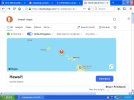
I would end up at a URL like "https://duckduckgo.com/?q=hawaii+map&t=ffnt&iaxm=maps&source=maps" (hawaii might be anything else).
Now however, the page gives me the left pane sidebar, but the map itself never loads. When Task Mgr. is running it shows the CPU spiked at 100% for as long as I allow the page to attempt loading (up to 3 minutes once). When I eventually close that tab, the CPU remains spiked for sometimes another 30 seconds before dropping back down to it's normal condition.
Then I tried opening the same map URL in 360Chrome and found that this browser had also been affected. The map eventually did load, but it took 3 or 4 times as long. When it finally was up, panning and zooming was so sluggish it was an annoying and useless way to do anything. So then I wondered could DDG have made some sort of changes to their search/map rendering recently? Then I went to my Dell laptop also running WinXP SP3 with identical browsers. The map URL loaded fast and normal on both browsers on that machine. Obviously I thought, Supermium had made some sort of change to the system that's affecting all the other browsers, and who knows what else!
At this point I decided to get rid of Supermium. Even though it did what I wanted, the trade off wasn't worth it for me, so I first tried running the Uninstall.exe. It reported something like "No formal setup found". Next I looked for Supermium in "Add/Remove Programs" and found none (as expected), deleted the Supermium directories, and looked for any entries in the Registry. There were only 3 that Windows created pointing to the D/L archive file in the Downloads directory. Then rebooted and tried the other browsers again...... no joy.
I never bothered backing up the 360Chrome files cuz I really don't like Chrome in the first place, but I had backed up MyPal right b4 I even started playing with Supermium. So I replaced both of the config directories, and the main program from my backups. Still same behavior. Then I try deleting site specific cookies and cache, and eventually ALL cookies and cache. No affect. Next I delete everything MyPal again, and do a fresh install with virgin profile directories. The new install still won't load that map URL.
Now I'm getting a bit frustrated, so I delete all the MyPal directories again, and run the Windows Restore taking the system back to 3 days b4 I even D/L that damn Supermium file! On restart I ran CCleaner to check the Registry... it only found half a dozen unrelated file extensions. So now I do another fresh install of MyPal, and it still won't deal with that DDG map. Along the way I had discovered that by signing into YouTube (Google) account, the news sites suddenly displayed embedded videos correctly again, but nothing so far has resolved the DDG mapping.
I've looked at the Services running, and don't see any odd-balls. At one point I even did the F8 "Last config that worked" for the hell of it. Now I'm contemplating something really insane, which would be to run the damn Supermium Setup.exe, and then the Uninstall.exe to see if that removes what ever this program did to my system.
Got any better ideas?
So I extracted the contents into a new directory, and ran the Chrome.exe executable. Then I spent about 30 minutes or so with it doing the normal configuration stuff. I checked the Doc's&Settings directory along the way and noted that Supermium was NOT a portable browser as it had created a new directory for it's profile. After that first session, the browser opened very quick, and loaded a couple of those problem pages MyPal didn't want to, so I was happy with that. Eventually, I shut it back down and went back to my main browser which is the MyPal78.0.2.
It didn't take long to notice some new issues of sites loading slowly. My news sites that formerly had embedded video now had only black boxes instead, and the biggest issue for me was the map rendering seems now to be completely broken. I use maps a lot, and my favorite for some time has been the DuckDuckGo maps. I would just type in an address or country followed by "map" on the search bar, then click on the first choice of maps resulting from that search, and the browser gave me a very detailed and responsive interactive map.
I would end up at a URL like "https://duckduckgo.com/?q=hawaii+map&t=ffnt&iaxm=maps&source=maps" (hawaii might be anything else).
Now however, the page gives me the left pane sidebar, but the map itself never loads. When Task Mgr. is running it shows the CPU spiked at 100% for as long as I allow the page to attempt loading (up to 3 minutes once). When I eventually close that tab, the CPU remains spiked for sometimes another 30 seconds before dropping back down to it's normal condition.
Then I tried opening the same map URL in 360Chrome and found that this browser had also been affected. The map eventually did load, but it took 3 or 4 times as long. When it finally was up, panning and zooming was so sluggish it was an annoying and useless way to do anything. So then I wondered could DDG have made some sort of changes to their search/map rendering recently? Then I went to my Dell laptop also running WinXP SP3 with identical browsers. The map URL loaded fast and normal on both browsers on that machine. Obviously I thought, Supermium had made some sort of change to the system that's affecting all the other browsers, and who knows what else!
At this point I decided to get rid of Supermium. Even though it did what I wanted, the trade off wasn't worth it for me, so I first tried running the Uninstall.exe. It reported something like "No formal setup found". Next I looked for Supermium in "Add/Remove Programs" and found none (as expected), deleted the Supermium directories, and looked for any entries in the Registry. There were only 3 that Windows created pointing to the D/L archive file in the Downloads directory. Then rebooted and tried the other browsers again...... no joy.
I never bothered backing up the 360Chrome files cuz I really don't like Chrome in the first place, but I had backed up MyPal right b4 I even started playing with Supermium. So I replaced both of the config directories, and the main program from my backups. Still same behavior. Then I try deleting site specific cookies and cache, and eventually ALL cookies and cache. No affect. Next I delete everything MyPal again, and do a fresh install with virgin profile directories. The new install still won't load that map URL.
Now I'm getting a bit frustrated, so I delete all the MyPal directories again, and run the Windows Restore taking the system back to 3 days b4 I even D/L that damn Supermium file! On restart I ran CCleaner to check the Registry... it only found half a dozen unrelated file extensions. So now I do another fresh install of MyPal, and it still won't deal with that DDG map. Along the way I had discovered that by signing into YouTube (Google) account, the news sites suddenly displayed embedded videos correctly again, but nothing so far has resolved the DDG mapping.
I've looked at the Services running, and don't see any odd-balls. At one point I even did the F8 "Last config that worked" for the hell of it. Now I'm contemplating something really insane, which would be to run the damn Supermium Setup.exe, and then the Uninstall.exe to see if that removes what ever this program did to my system.
Got any better ideas?
The problem with supermee is it is to slow to load and run and need a lot of memoryRecently developed a problem with MyPal78.0.2 browser, and the culprit seems to be Supermium. Due to those few web sites that would no longer load, I decided to try out Supermium, so I downloaded the "supermium_144_32_nonsetup.zip" file. It contains no ReadMe or other instruction, and Github is not the easiest place for me to find what I'm looking for, so I assumed by the name that this was a "portable" version of the browser. I was wrong. There is a Setup.exe file in the archive.... not sure why.
So I extracted the contents into a new directory, and ran the Chrome.exe executable. Then I spent about 30 minutes or so with it doing the normal configuration stuff. I checked the Doc's&Settings directory along the way and noted that Supermium was NOT a portable browser as it had created a new directory for it's profile. After that first session, the browser opened very quick, and loaded a couple of those problem pages MyPal didn't want to, so I was happy with that. Eventually, I shut it back down and went back to my main browser which is the MyPal78.0.2.
It didn't take long to notice some new issues of sites loading slowly. My news sites that formerly had embedded video now had only black boxes instead, and the biggest issue for me was the map rendering seems now to be completely broken. I use maps a lot, and my favorite for some time has been the DuckDuckGo maps. I would just type in an address or country followed by "map" on the search bar, then click on the first choice of maps resulting from that search, and the browser gave me a very detailed and responsive interactive map.
I would end up at a URL like "https://duckduckgo.com/?q=hawaii+map&t=ffnt&iaxm=maps&source=maps" (hawaii might be anything else).
Though I did not know duckduck did maps though, do you have a direct link to there mapping site by any chance please?
Previous post describes how I generally access their maps, along with a sample URL.Though I did not know duckduck did maps though, do you have a direct link to there mapping site by any chance please?
EDIT: Now this is interesting, I just clicked on my own link of the previous post (#15), and for the first time in almost a week the map loaded, although rather slowly. Once loaded however, panning, zooming, and switching views was very sluggish. Still, an improvement. So then I typed in "Hawaii map" on the DDG search, clicked the big map that usually comes up, and the results were the same as clicking the link above. I wish I knew why. Maybe I just need to try loading this thing 1000 times and it'll work itself out?
Last edited:
The nearest thing I could find was doing this (see image attached)Previous post describes how I generally access their maps, along with a sample URL.
EDIT: Now this is interesting, I just clicked on my own link of the previous post (#15), and for the first time in almost a week the map loaded, although rather slowly. Once loaded however, panning, zooming, and switching views was very sluggish. Still, an improvement. So then I typed in "Hawaii map" on the DDG search, clicked the big map that usually comes up, and the results were the same as clicking the link above. I wish I knew why. Maybe I just need to try loading this thing 1000 times and it'll work itself out?
Attachments
I recommend Supermium 126.0.6478.261 R7 I used until very recently. I updated to
Supermium 132.0.6834.226 R5.02 and then realized I didn't need to because I overlooked something on the website I was trying to access.
I did get to see a big difference and I believe with each Supermium version, they get more demanding on the O/S.
That said, I run a later Intel i5 cpu box with the PAE patch. I'm pretty happy with what I use it for.
My 2 cents.
Supermium 132.0.6834.226 R5.02 and then realized I didn't need to because I overlooked something on the website I was trying to access.
I did get to see a big difference and I believe with each Supermium version, they get more demanding on the O/S.
That said, I run a later Intel i5 cpu box with the PAE patch. I'm pretty happy with what I use it for.
My 2 cents.
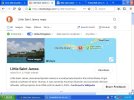
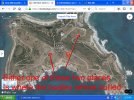
Though it dose work with other search terms like the one in the photo attached. And it also has satalight images as well!
Dose anyone know if I could download the entire content of the mapping site? Why because I am trying to get away from the internet as much as possible as I am getting ready for that big day when it comes (cyber great reset!) when they shut down the internet, blame it on the Russians and China then reopen it and lock it so its restricted for digital tattooed user only! (As Klaus Schwab (former leader of the WEF) stated, expect power cuts and cyber attacks to make the plandemic hoax look like a chip-munks tea party!)
But there again they might change there minds and do it gradually over a long period of time. Example, in the UK its nearly law now that to access SpackerBook you need to face scan and ID in to use it! (not that I would use such a retarded web site only to be messed around with tyre kickers on market place!(they really have got nothing better to do with there sad little lifes now the the western economy has been shut down!)))
But I want to get as much software in my physical possession (weather that be a floppy, CD memory stick or on my back up HDD) as possible. So I have been buying used CDs on ebay like word processors, photoshop elements, A-Z road atlases of the UK, encylepidias and so on. on that note, wikipida have agents that allow you to download there entire contence from back on 2007 for about 2-3GB of data, but I cant find a 32 bit version to run on XP for it! But downloading the entire mapping of a map like that would be a grand idea!
Dose anyone know if I could download the entire content of the mapping site? Why because I am trying to get away from the internet as much as possible as I am getting ready for that big day when it comes (cyber great reset!) when they shut down the internet, blame it on the Russians and China then reopen it and lock it so its restricted for digital tattooed user only! (As Klaus Schwab (former leader of the WEF) stated, expect power cuts and cyber attacks to make the plandemic hoax look like a chip-munks tea party!)
But there again they might change there minds and do it gradually over a long period of time. Example, in the UK its nearly law now that to access SpackerBook you need to face scan and ID in to use it! (not that I would use such a retarded web site only to be messed around with tyre kickers on market place!(they really have got nothing better to do with there sad little lifes now the the western economy has been shut down!)))
But I want to get as much software in my physical possession (weather that be a floppy, CD memory stick or on my back up HDD) as possible. So I have been buying used CDs on ebay like word processors, photoshop elements, A-Z road atlases of the UK, encylepidias and so on. on that note, wikipida have agents that allow you to download there entire contence from back on 2007 for about 2-3GB of data, but I cant find a 32 bit version to run on XP for it! But downloading the entire mapping of a map like that would be a grand idea!